Chapter 2: General Policies
Section A - Miscellaneous
Activity Requirements
At DVAL we ask all pilots to file 1 PIREP over a rolling 120-day period.
After 120 days without a PIREP have passed and the activity rule has been triggered, pilots will have a grace period of 10 additional days in which they can still file a PIREP and keep their account active. The activity period can be reset if requested prior to deactivation.
In addition, we ask all new pilots to file 1 PIREP, which has a status of 'Complete' or 'Accepted', within 10 days of registration.
PIREPs must be filed via Pegasus to count towards the activity requirement.
Rejected PIREPs count towards the activity requirement but Invalidated PIREPs do not count towards the activity requirement.
If a pilot’s account is removed due to inactivity, their PIREP history will not be lost, and the account can be reactivated under the same Pilot ID by re-joining the VA in vAMSYS with the same log-in credentials you used previously.
If that fails, pilots should contact the admins via email (dal@fusionvaa.com) or by opening a ticket in our Discord to request activation. Do not try to create a new account under a new email address; request the old one to be reactivated.
Holidays
vAMSYS includes a holiday function which allows pilots a period of time during which the Activity Requirements no longer apply. DVAL gives pilots an allotment of 180 days per year of holiday time.
To be eligible, the pilot’s account must be older than 10 days (they must have met the New Hire Activity Requirements).
Holidays can be requested by opening the "My Profile" menu on the left hand navigation menu in vAMSYS and selecting "Preferences" from the dropdown box. On the screen that subsequently opens, you will find the Holidays section in the middle of the page, where the amount of time available to you will be listed above the "Book Holiday" button. Clicking "Book Holiday" will open up a prompt where you can select the start and end dates for the holiday period.
Once submitted, your holiday time will appear in the "Your Holidays" section immediately below, where you can see the start and end dates, status, and a "Delete" button where you can remove/cancel the holiday period.
While on holiday, flights cannot be booked. The holiday period can be cancelled at any time and unused days will be returned to the holiday allotment.
Ranks
Points and bonus points are not a combined pool. In other words, the ranks in the table below require both the amount of regular points listed and the amount of bonus points listed -- for example, for First Officer, you must have 11,500 regular points and 6,500 bonus points to achieve the rank; having a total of 18,000 total regular points (the sum of the regular and bonus poins required) but 0 bonus points is not sufficient to achieve the rank.
To provide a sense of career progression, DVAL has several tiers of ranks which pilots will progress through as they accrue hours, points, and bonus points from their PIREPs.
At this time, vAMSYS does not allow routes or aircraft types to be rank limited; thus, pilots can fly any aircraft and route (providing all livery and aircraft type requirements are followed) regardless of their rank. Should vAMSYS add functionality to limit aircraft types and routes based on ranks in the future, DVAL will consider implementing these limitations.
There are Honorary/Staff ranks which will be disbursed at the sole discretion of the admin team for certain purposes. These cannot be qualified for independently or requested.
| Rank | Hours Required | Points Required | Bonus Points Required | PIREPs Required |
|---|---|---|---|---|
| Probationary First Officer | 0 | 0 | 0 | 0 |
| First Officer | 100 | 11,500 | 6,500 | 50 |
| Captain | 275 | 31,500 | 18,500 | 100 |
| Line Check Airman | 300 | 100,000 | 50,000 | 300 |
Transfer Hours
You must apply for a rank transfer before you have filed your first PIREP. After you have filed your first PIREP, the rank transfer functionality becomes unavailable and this cannot be overridden by staff.
vAMSYS uses a "direct entry" transfer system -- if you quality, you receive a promotion to a specific rank (First Officer) and not an exact copy of your flight history and logged hours.
To qualify, you must be able to transfer in 100 hours of time from any other Delta-based virtual airline, whether it is part of the vAMSYS network or not, and you must be able to provide publicly accessible proof of those hours (screenshots of a logbook at another VA are acceptable).
Please note that:
- We only allow new members to transfer into the First Officer rank if they meet our requirement of 100 hours.
- If the new member requests to transfer less than 100 hours, it will be rejected.
- If the new member requests to transfer more than 100 hours, they will receive 100 hours only and be transferred in at the rank of First Officer.
For example, if you have 500 hours at another Delta VA, you will receive exactly 100 hours at DVAL and your starting rank will be First Officer.
In order to apply for a rank transfer -- again, before you have filed your first PIREP -- click "My Profile" in the left-hand navigation menu in vAMSYS and then select "Preferences" from the drop-down menu. On the screen that subsequently opens, you will find the "Rank Transfer" section below the Holidays sections. Clicking "Apply for Rank Transfer" will open a window that explains our policy and provides a form to collect the required information.
You must include some form of publicly-accessible proof with your transfer request. Transfer requests without adequate proof will be rejected.
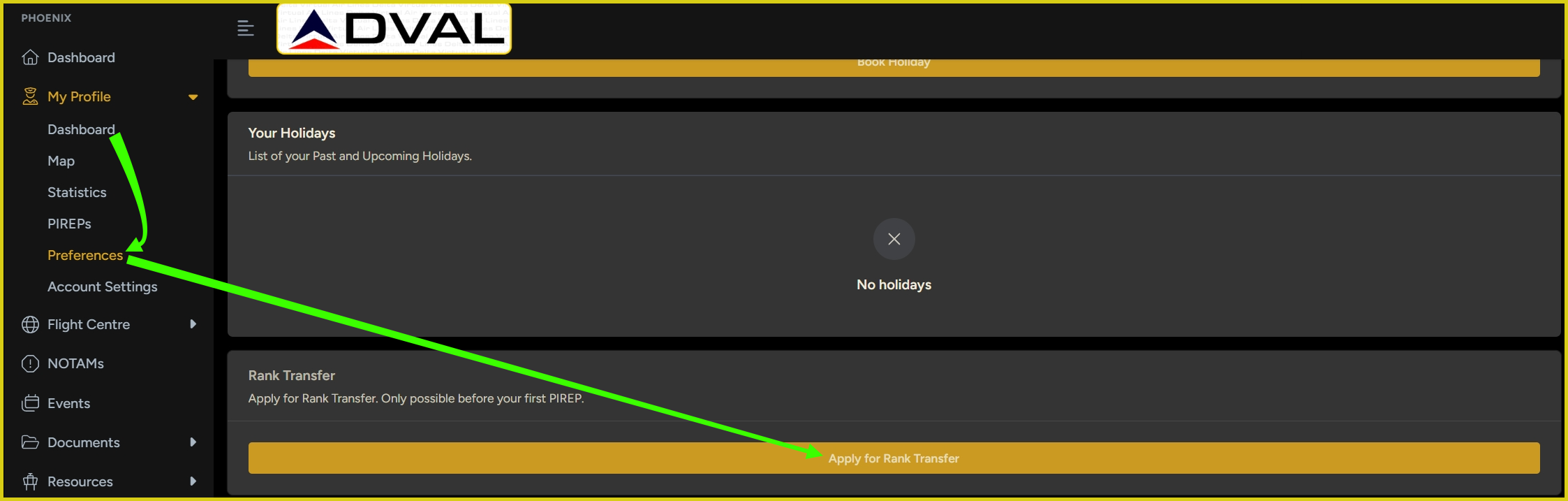
Navigate to My Profile -> Preferences -> Rank Transfer before your first PIREP at DVAL to apply for a rank transfer.
Group Flights and Online Networks
We encourage, but do not require, pilots to utilize VATSIM and other online networks, and from time to time we may organize online group flights or promote online events in concert with ATC networks such as VATSIM.
As pilots will be representing DVAL, we require full compliance with the policies of any online ATC or multiplayer platform in use, as well as our own Code of Conduct and Bylaws while connected to an online ATC or multiplayer network. Any pilots who are found to have violated any of these policies will be subject to disciplinary action up to and including permanent removal of their account.
Finally, we require pilots to follow the procedures found in this document and any future checklists, AOM/FCOMs, etc. that may be released, while flying with others or online. In representing DVAL you represent the abilities and qualities we wish to be known for, and DVAL will be judged by the example set by our pilots. For that reason, we ask that pilots wait to fly online until they are confident in their ability to correctly operate their aircraft and to follow ATC instructions. We encourage anyone to seek guidance and tutoring if they need assistance. Repeated instances of immature or incompetent behavior online will be subject to disciplinary action up to and including permanent removal of their account.
Historic Routes
Heritage/historic airline flights must be operated with a livery that matches the operator. In other words, a Northwest A320 flight must use a Northwest A320 livery, a Delta A320 livery will be invalidated.
Some historic flights from past eras of Delta Air Lines will be included in our schedules for pilots who may be interested in exploring these alternate schedules. These flights are subject to all the same PIREP scoring, points, and operational requirements outlined in this document for regular flights and are not restricted to any rank levels.
You can easily differentiate between "modern" flights from the current schedule and "historic" flights from past timetables by checking the tags shown on each flight.

An example of the route tags visible for each flight denoting which era/timetable the flight is from.
Section B - PIREPs and PIREP Review
PIREP Processing Statuses
It is important to understand that having PIREPs sitting in the review queue does not prevent you from booking and flying additional flights. The system may require a reply on a PIREP — see the following section — before it lets you book a flight, but once all PIREPs that require it have been replied to, you can book a new flight and continue flying. Our team will review PIREPs that are sent for manual review as soon as possible, but keep in mind that review times are dependent on staff availability.
All PIREPs are processed automatically when submitted and may take up to ten (10) minutes to be processed by the system. In certain circumstances, which will be discussed in more detail later, a PIREP will fail automatic scoring and will require a manual review by the admin and staff team. A manual review can take longer, up to a week in some circumstances, but every attempt is made to go through the manual review queue several times per week.
Every PIREP has a status that tells you where it is in the review process. These are:
- Accepted: Your PIREP passed all checks. Hours and points have been fully awarded and count towards your rank progression and statistics.
- Rejected: Your PIREP has been either automatically rejected due to violating a scorer, such as a landing rate exceeding -500fpm for most fleets, or it has been manually rejected by staff for a more specific issue. A comment will almost always be left on the PIREP in the latter situation. Rejected PIREPs grant the logged hours to the pilot but no points are awarded. They do count towards activity requirements.
- Invalidated: Your PIREP has been either automatically invalidated due to violating a scorer, such as a landing rate exceeding -600fpm for most fleets or using an invalid livery or prohibited aircraft add-on, or it has been manually rejected by staff for a more specific issue. A comment will almost always be left on the PIREP in the latter situation. Invalidated PIREPs do not log the hours flown nor do they award points. They do not count towards activity requirements.
In addition, there are several intermediary statuses that may be encountered before a PIREP receives its final status:
- Processing: Your PIREP has been received and the system is scoring it. This usually takes a few seconds after landing, but may take up to ten (10) minutes to be processed by the system.
- Awaiting Review: Your PIREP triggered one or more autoreject conditions and has been flagged for manual review by staff. You can still see the PIREP details while it is under review.
- Reply Needed: Your PIREP requires you to leave a comment explaining a scorer violation or some other issue that has sent the PIREP for manual review. You cannot book additional flights until you leave a reply on the relevant PIREP. See the section immediately below this one for more information.
"Reply Needed"
Leaving a comment on a PIREP via Pegasus or within vAMSYS will automatically result in the PIREP being sent for manual review. This should not be done unless a comment has been requested as outlined below, or if the pilot knows in advance that the PIREP will fail auto processing and the pilot wishes to account for the circumstances in advance.
PIREPs with the status of Reply Needed require prompt attention by the pilot, who will not be able to book or start a new flight until they leave a response on the PIREP. No notification will be sent via email; the next time the pilot tries to book a flight they will be prevented from doing so and instead will see the following:
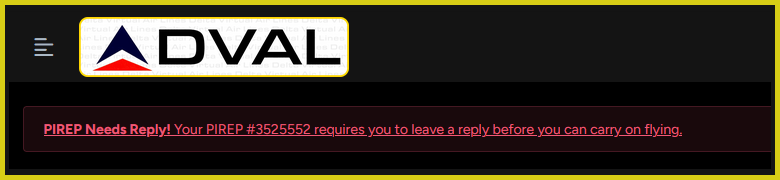
The alert visible in vAMSYS stating that a reply is needed on a recent PIREP.
Clicking on the underlined text will take the user to the View PIREP screen, where they will need to click the Add Comment button to leave a reply.

A demonstration of how to add a comment to a PIREP.
Please note that rejections or invalidations of PIREPs due to landing rates are not up for negotiation. We apply these rules universally, regardless of alleged circumstances. Leaving a comment claiming a gust of wind, low frame rates, or some other extenuating circumstances caused the hard landing only risks a PIREP's review being further delayed as it will move the PIREP into the manual review queue. It is best to just accept the situation, learn from it, and seek to further refine your landing technique.
Requirements for PIREP Approval
The following requirements must be met for a PIREP to be approved:
- You must book the same type of aircraft that you fly -- this extends to subvariants.
- The flown livery must match the booked operator or, for Delta Connection flights, must be a Delta Connection livery.
- The flown livery must not be fictional, blank, or a house/developer livery.
- The aircraft type must be able to complete the flight while meeting all requirements for reserve fuel, etc.
- The aircraft's performance must be suitable for the runways used at the departure and arrival airports and any applicable alternates.
- All other flight planning requirements found in Chapter 3 of the FOM must be adhered to.
- The aicraft add-on used must not be on the Prohibited Aircraft Add-on List.
- The recorded landing rate must be below -500 feet per minute for most aircraft fleets.
- The final point total must be above 0.
- The PIREP must not exhibit any general gross violations of good airmanship.
Keep these common mistakes in mind:
- The Fenix is an A320ceo (A320) and is not an A320neo (A20N). The FBW is an A320neo (A20N) and is not an A320ceo (A320). Delta Air Lines does not currently operate A20N, thus the FBW A20N cannot be used, nor any other A320neo add-on.
- The ToLiss A321ceo (A321) must be used as an A321ceo and the ToLiss A321neo (A21N) must be used as an A321neo. The livery must distinguish between the two in some fashion -- engine type, CEO vs NEO, etc.
- The LatinVFR family of Airbus aircraft is prohibited and the use of LVFR aircraft will result in PIREP invalidation no matter the livery or modification used.
Landing Rates
We are not able to modify, remove, or delete the landing rate recorded by Pegasus.
It has become fashionable in the flight simulation community to pursue landing rates as low as possible. While a smooth landing is satisfying to pilots both real and virtual, it is not advantageous or safe to pursue a landing with a low vertical speed as the top priority.
To discourage this behavior, we have made our landing rate scorer binary – your landing was safe (less than 500 fpm), or it wasn’t (greater than 600 fpm). Between 500 and 600 fpm your PIREP will be rejected (hours granted but no points) while PIREPs greater than 600 fpm will be invalidated (no hours or points granted).
We recommend you target a consistent landing rate between -150 and -300 fpm.
Start and End Locations
A flight must begin and end at either a gate or a remote stand in a cold and dark or turnaround power state. Please do not start a flight on a runway or taxiway or with the aircraft powered up with engines on. You are not required to use a Delta or Delta Connection gate, but it is encouraged.
In-flight Refueling Prohibited
It is each pilot’s responsibility to ensure when planning their flight that they carry enough fuel on board to reach their destination, as well as fuel for any required alternates and/or contingency fuel. See Chapter 3 of the FOM for more details on this topic.
Pegasus will detect any and all instances of fuel changes in-flight, and any PIREP with a fuel increase during flight is subject to immediate invalidation without appeal by the admin/staff team.
If a flight cannot be completed due to the fuel load, the pilot should divert to the closest company airport rather than increase fuel in flight. Diverting appropriately combined with an honest assessment in the required PIREP comment will upgrade the resulting PIREP from invalidation to rejection (hours granted, no points).
PIREP Claims
Due to the great potential of abuse, you may only submit one (1) Claim per calendar month.
Please note that abuse of this system may result in rejection of subsequent Claims and/or PIREPs filed with Pegasus and may result in permanent removal from DVAL.
Because it might not always be possible to file PIREPs via Pegasus, vAMSYS provides the ability to file a PIREP Claim. However, we do not allow the Claims system to be used as a manual PIREP system or in lieu of using Pegasus. All PIREPs should be tracked and submitted via Pegasus, the Claims system is a fallback option only.
You may file a claim by clicking the blue active booking tile on the vAMSYS Dashboard and then from the booking screen selecting the "Manual PIREP / File a Claim" option under Booking Actions. You will be required to include proof that your flight took place, information on accepted forms of proof is below.
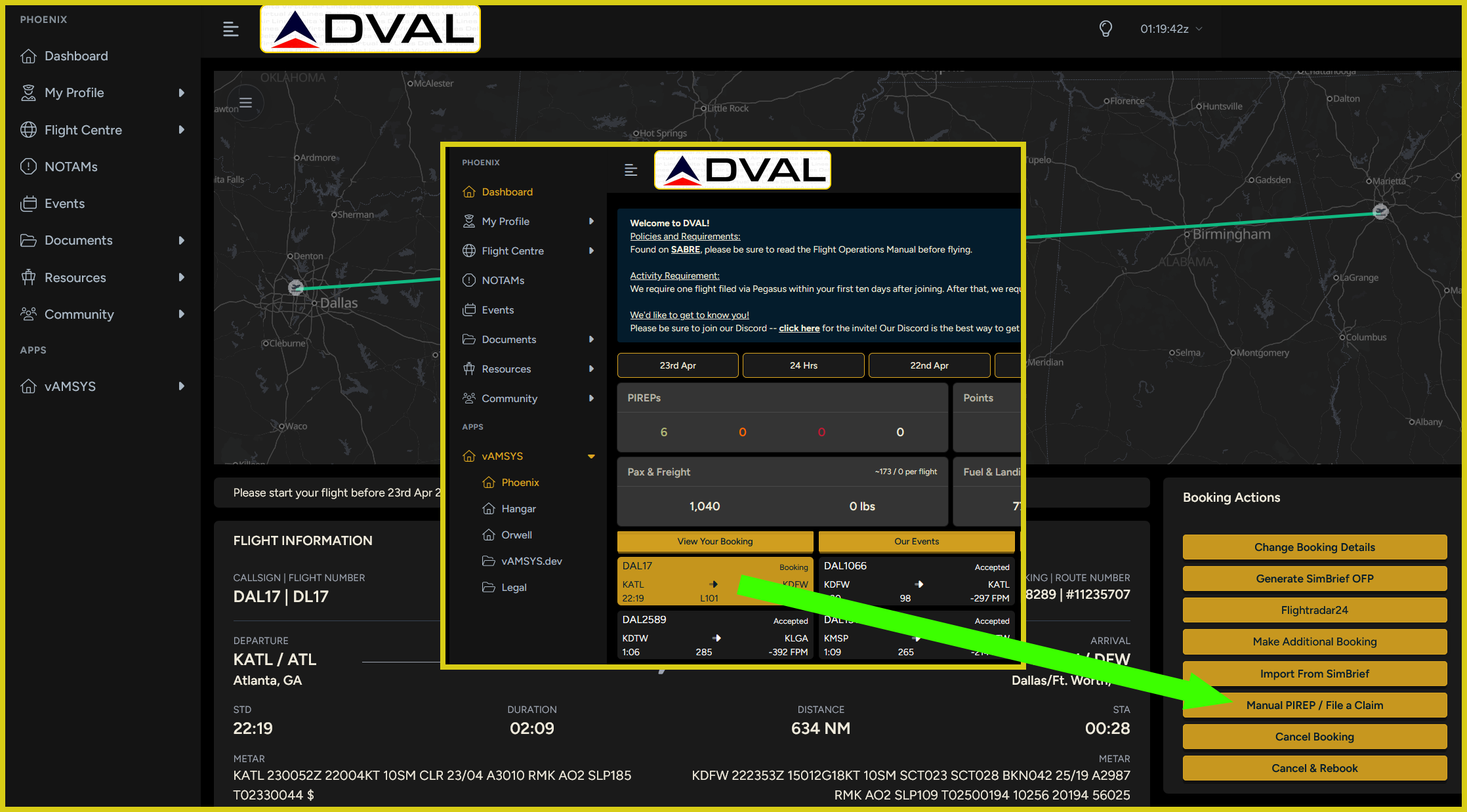 Where to go to file a PIREP Claim.
You should only use this function if Pegasus crashed during your flight or if you cannot otherwise file a PIREP via Pegasus for a flight you began tracking with Pegasus. You may also file a Claim if you fail to track your flight in Pegasus, provided you can provide proof that the flight took place.
In the event of a simulator crash during the flight, please try to recover the flight should you use a tool -- such as Volanta Premium -- or add-on that allows you to recover a saved flight. If that is not possible, a claim can be filed if:
- The flight crashed after 80% of the flight had been completed (measured against the scheduled flight time);
- Some kind of proof of flight can be included showing the progress of the flight up to the point of the simulator crash.
Proof of Flight
You are requried to attach proof that the flight occurred to your claim. This can either be an image or a link.
Acceptable forms of proof:- A screenshot of Pegasus showing the ACARS page with the flight time and log.
- A screenshot of Volanta, STKP, etc. showing the flight's statistics including the aircraft type, flight time, landing rate, etc.
- A link to the flight's history on https://stats.vatsim.net/
- A link to the flight's history on Volanta, STKP, etc.
- A screenshot of or link to the flight's history captured by any other 3rd party platform similar to the tools discussed above.
- A screenshot of the cockpit.
- A screenshot of a 3rd party tracking tool that includes no information about the flight other than the flight path.
- A screenshot of another VA's ACARS client.
- No proof at all.
- Any screenshot or link to any kind of tool or evidence that does not display enough information to validate flight time, aircraft type, etc.
Time Acceleration, Slewing, and Pausing
Under no circumstances will PIREPs be accepted if time acceleration is used. It is strictly forbidden without exception.
Pausing is allowed during a flight. PIREPs that have over sixty (60) minutes of cumulative time paused will be sent for a review – please leave a comment explaining the reason for the long pause time.
We do not have a limit for pause time, but we do ask pilots to not pause excessively. This is a policy we are still trying to develop, so for the time being it is a judgment call by the admin/staff team on whether or not someone is abusing pausing during flights.
Generally speaking, we mainly ask that a flight be completed during one “sitting” — please avoid starting a flight in the evening, pausing overnight, and finishing it the next day. If a long haul flight is long enough that you can leave the simulator running and come back to it in the morning and land, that is acceptable — rest periods are a thing in the real world, so we are not going to deprive you of that in the simulator. Pausing at TOD after an overnight flight is acceptable, but again please try to finish your flight as soon as is practicable after that (meaning don’t leave an overnight flight paused all day at the TOD and come back to complete the flight in the evening if you can avoid it).
We understand that plans change after a flight has been started, but if something changes after you’ve started a flight to where you will have to leave the simulator paused for a long time before you can complete the flight, we recommend you instead abandon the flight and restart it later when you can complete it in a reasonable amount of time.
The reasoning for our caution around pausing is twofold: one, we routinely see cases where a flight being paused causes a glitch with the flight tracking software, corrupting the PIREP log or causing it to never come out of the paused state to track the rest of the flight, and there is no easy way for us to fix this for a pilot without the pilot using up their monthly PIREP claim; two, particularly with MSFS, active pause can cause the aircraft to freeze in position while the flight time clock continues to run, incorrectly and unfairly inflating the flight time for that PIREP, which creates an opportunity to abuse the system to quickly accrue unearned hours. Active pause doesn’t always do this, but we do see it fairly regularly and when we see PIREPs where this happened they are invalidated.
Slewing during a flight is prohibited. You may change your aircraft location via slew before tracking starts. If tracking has started and you need to slew, warp to another gate via GSX, etc., cancel tracking in Pegasus, move the aircraft, and then start tracking again.
Section C - Aircraft Liveries
Livery Reviews
It is important to understand that a previously approved livery may be flagged for review again in the future. An update to the addon that was used, a change to the livery’s folder name, changes to the aircraft’s name in its configuration files – things of this nature may prompt a re-review. It is not necessary for you to tell us that you’ve used a livery before, or that it came off of the Recommended Livery list, etc., as it will not speed up your PIREP’s review, nor will it prevent additional reviews in the future.
Every time a PIREP is submitted, Pegasus and vAMSYS logs the livery used on the flight and compares the logged livery against a database of previously flown liveries.
When it flags a livery as having been seen for the first time, it is placed into a manual review queue for the admin/staff team to check. This allows us to ensure you have flown the correct aircraft type and used an appropriate livery.
Having the PIREP held for livery review is not necessarily an indication that there is a problem with your livery and/or PIREP. If you used an appropriate livery and your PIREP was marked by the system as Awaiting Review, please feel free to continue flying and the member of staff reviewing the PIREP will approve the livery and it will be added to the approved livery list.
Livery Requirements
We ask, but do not require, that pilots book the same registration that they are going to fly.
We do require that the booked and flown aircraft types match.
Heritage/historic airline flights must be operated with a livery that matches the operator. In other words, a Northwest A320 flight must use a Northwest A320 livery, a Delta A320 livery will be invalidated.
We require that the livery used matches the operator of the booked flight in vAMSYS. A Delta flight must be flown with a Delta livery, a Northwest flight with a Northwest livery, etc.
We do not allow blank, house, manufacturer, or add-on developer liveries to be used in place of the livery of the booked operator.
We are flexible with Delta Connection operators as livery availability is often more limited than for mainline aircraft. For Delta Connection flights, we require that pilots utilize a Delta Connection livery but we do not require the underlying operator to match. For example, if you book an Endeavor/Delta Connection CRJ900 flight, the flight can be flown with a Delta Connection CRJ900 livery from any Delta Connection operator, so long as that operator operates that aircraft. Delta Connection's current operators are Endeavor Air, Republic Airways, and SkyWest Airlines.
Please note that many regional operators operate flights on behalf of multiple airlines; you must use a Delta Connection livery for any Delta Connection operators who also operate for other airlines. In other words, a United SkyWest livery is not appropriate for a Delta Connection SkyWest flight.
We also encourage our pilots to use an era-appropriate livery for flights from our historic schedules, but it is not required.
Delta's jet-era liveries were in use during the following years:
- "Widget" Livery: 1962-1997
- "Ron Allen" or "Landor" or "Interim" Livery: 1997-2000
- "Colors in Motion" or "Wavy Gravy" or "Deltaflot" Livery: 2000-2007
- "Onward and Upward" Livery: 2007-Present
Section D - Aircraft Types and Add-ons
Aircraft Categories and Substitutions
You may not substitute another aircraft type on a flight if it is not bookable for that flight, even if the real flight is using that aircraft type on the day.
For our modern schedules, DVAL assigns an aircraft category to a route based the aircraft that operates that route in the real world at the time the schedule loaded in the system was current.
These categories determine what you are allowed to substitute -- in other words, you can only fly what you can book.
For example, if DAL123 from KABC to KDEF is operated with an A319, you will be able to book the A319, A320, A321, and A21N on that flight. You cannot book one of those types but fly a B738, etc. For more information, please see the aircraft category tables below.
Instances will arise where the aircraft that was correct as of the last schedule update is no longer correct. Due to the way the vAMSYS platform handles bookings, liveries, fleets, and aircraft types, you cannot substitute the "correct" aircraft in place of the aircraft types that are available to book. Doing so will result in your PIREP being invalidated.
We understand that this possible situation could be frustrating, but instances where there is no alternate flight number for the same pairing with the desired aircraft will be rare, and we try to update schedules at least once a month, at which time the equipment assignment will be updated.
Please also note that vAMSYS's functionality does not allow us to restrict aircraft types or categories by rank. All aircraft and routes are available to use starting at 0 hours.
We believe this system provides sufficient flexibility to allow members to operate fairly realistically without making things an unstructured free-for-all.
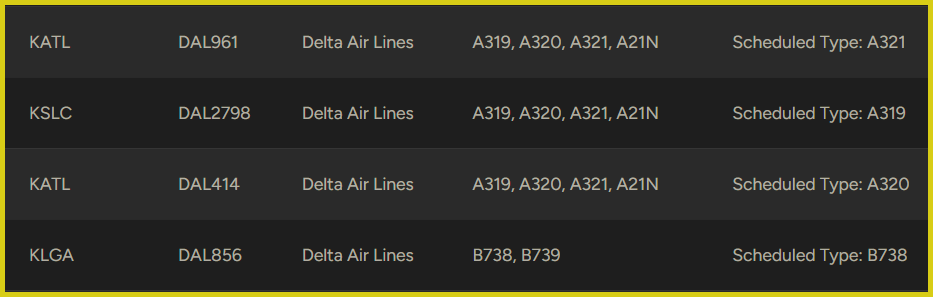
An example of aircraft categories in practice.
Aircraft Category Tables
These tables describe how we assign aircraft to routes based on the original aircraft type assigned to the route. This allows us to define within the system (vAMSYS) the maximum amount of aircraft substitutions allowed by users. To repeat, if you can't book it on a route, you can't fly it on that route.
Current Timetables
Delta Connection| Category | Aircraft Types |
|---|---|
| Commuter 1 (EDV) | CRJ7, CRJ9 |
| Commuter 2 (RPA) | E170, E175 |
| Commuter 3 (SKW) | CRJ51, CRJ7, CRJ9, E175 |
- The CRJ-550 is a CRJ-700 with fewer seats to meet scope clause requirements. SimBrief has a CRJ-550 profile that is labeled as CRJ5 and we use that in our schedules so that the Dispatch via SimBrief functionality works properly. However, you should file as a CRJ7 on VATSIM, etc., to be accurate.
| Category | Aircraft Types |
|---|---|
| Mainline Narrow-body A1 | A319, A320, A321, A21N |
| Mainline Narrow-body A2 | BCS1, BCS3 |
| Mainline Narrow-body B1 | B738, B739 |
| Mainline Narrow-body B2 | B717 |
| Mainline Narrow-body B3 | B752, B753 |
| Category | Aircraft Types |
|---|---|
| Mainline Wide-body A1 | A332, A333, A339 |
| Mainline Wide-body A2 | A359 |
| Mainline Wide-body B1 | B763 |
| Mainline Wide-body B2 | B7641 |
- Delta maintains the B767-400ER as a separate fleet and seniority list; crews do not cross over with the B757/B763. Given this, we break it out into a separate category.
Historic Timetables
Historic Narrow-body (Delta 1994)| Category | Aircraft Types |
|---|---|
| Mainline Narrow-body B1 | B722 |
| Mainline Narrow-body B2 | B732, B733 |
| Mainline Narrow-body B3 | B752 |
| Mainline Narrow-body D | MD88 |
| Category | Aircraft Types |
|---|---|
| Mainline Narrow-body B1 | B722 |
| Mainline Narrow-body B2 | B732, B733 |
| Mainline Narrow-body B3 | B738 |
| Mainline Narrow-body B4 | B752 |
| Mainline Narrow-body D | MD88 |
| Category | Aircraft Types |
|---|---|
| Mainline Narrow-body A | A319, A320, A321 |
| Mainline Narrow-body B1 | B737, B738, B739 |
| Mainline Narrow-body B2 | B717, MD88 |
| Mainline Narrow-body B3 | B752, B753 |
| Category | Aircraft Types |
|---|---|
| Mainline Wide-body A | A310 |
| Mainline Wide-body B | B762, B763 |
| Mainline Wide-body L | L101 |
| Mainline Wide-body M | MD11 |
| Category | Aircraft Types |
|---|---|
| Mainline Wide-body B1 | B762, B763 |
| Mainline Wide-body B2 | B7641 |
| Mainline Wide-body B3 | B7722 |
| Mainline Wide-body M | MD11 |
- Delta maintains the B767-400ER as a separate fleet and seniority list; crews do not cross over with the B757/B763. Given this, we break it out into a separate category.
- Delta did not receive B777-200LRs (B77L) until 2008. In 2002, they were only operating B777-200ERs (B772).
| Category | Aircraft Types |
|---|---|
| Mainline Wide-body A | A332, A333 |
| Mainline Wide-body B1 | B744 |
| Mainline Wide-body B2 | B763 |
| Mainline Wide-body B3 | B7641 |
| Mainline Wide-body B4 | B772, B77L |
- Delta maintains the B767-400ER as a separate fleet and seniority list; crews do not cross over with the B757/B763. Given this, we break it out into a separate category.
Approved Aircraft Add-ons
If there is an add-on that you don’t see in one of the tables below, please double check with us before you use it for a PIREP. Contact us via Discord or email. There may be something we’ve overlooked, or there may be a reason why we’ve excluded it. Please do not assume.
Mainline
If a cell is empty (-) then there is no approved aircraft add-on for that aircraft type for that simulator
| Aircraft | MSFS 2020/2024 | P3D/FSX | XP11/12 |
|---|---|---|---|
| Airbus A220 | Synaptic A220 (When Released) | - | - |
| Airbus A319 (CFM) | Fenix A319 | FSLabs A319 Aerosoft A319 | Toliss A319 |
| Airbus A320 (CFM) | Fenix A320 1 | FSLabs A320 Aerosoft A320 | FlightFactor A320 ToLiss A320ceo |
| Airbus A321ceo (CFM) | Fenix A320 2 | FSLabs A321 Aerosoft A321 | ToLiss A321ceo 2 |
| Airbus A321neo (PW) | FSLabs A321neo | - | ToLiss A321neo 2 |
| Airbus A330-200 (PW) | Asobo/inibuilds A330-200 (MSFS 2024) | Aerosoft A330-200 | - |
| Airbus A330-300 (GE/PW) | Asobo/inibuilds A330-300 (MSFS 2024) | Aerosoft A330-300 | - |
| Airbus A330-900 (RR) | - | - | ToLiss A330-900 |
| Airbus A350-900 | iniBuilds A350-900 | - | FlightFactor A350 |
| Boeing 717-200 | - | TFDi B717 | - |
| Boeing 727-200 | FSS 727-200 | CaptainSim 727-200 | FJS 727-200 |
| Boeing 737-200 | - | CaptainSim 737-200 | FJS 737-200 |
| Boeing 737-300 | - | CaptainSim 737-200 | IXEG 737-300 |
| Boeing 737-700 | PMDG 737-700 | PMDG 737-700 | LevelUp 737-700 |
| Boeing 737-800 | PMDG 737-800 | PMDG 737-800 | Zibo 737-800 LevelUp 737-800 |
| Boeing 737-900/900ER | PMDG 737-900/900ER | PMDG 737-900/900ER | LevelUp 737-900 |
| Boeing 747-400 | - | PMDG 747-400 | - |
| Boeing 757-200 | - | QualityWings 757-200 CaptainSim 757-200 | FlightFactor 757-200 |
| Boeing 757-300 | - | QualityWings 757-300 CaptainSim 757-300 | FlightFactor 757-300 |
| Boeing 767-200ER | - | CaptainSim 767-200ER | FlightFactor 767-200ER |
| Boeing 767-300ER | - | CaptainSim 767-300ER | FlightFactor 767-300ER |
| Boeing 767-400ER | - | - | FlightFactor 767-400ER |
| Boeing 777-200ER (RR) | PMDG B777-200ER | PMDG 777-200ER | FlightFactor 777-200ER |
| Boeing 777-200LR (GE) | PMDG B777-200LR | PMDG 777-200LR | - |
| Lockheed L1011 | iniBuilds L1011 | JustFlight L1011 | - |
| McDonnell Douglas MD-11 | TFDi MD-11 | PMDG MD-11 | Rotate MD-11 |
| McDonnell Douglas MD-88 | Leonardo MD-88 3 | Leonardo MD-88 3 | Rotate MD-80 |
- The Fenix is an A320ceo (A320) and is not an A320neo (A20N). The FBW is an A320neo (A20N) and is not an A320ceo (A320). Delta Air Lines does not currently operate A20Ns; this add-on may not be used.
- The ToLiss A321ceo (A321) must be used as an A321ceo and the ToLiss A321neo (A21N) must be used as an A321neo. The livery must distinguish between the two in some fashion -- engine type, CEO vs NEO, etc.
- Delta only operated the MD-88 and we require the MD-88 be used; the MD-82/83 cannot be substituted.
Regional
If a cell is empty (-) then there is no approved aircraft add-on for that aircraft type for that simulator
| Aircraft | MSFS | P3D | XP11/12 |
|---|---|---|---|
| Bombardier CRJ-550 [1] | Aerosoft CRJ-550 | Aerosoft CRJ-550 | - |
| Bombardier CRJ-700 [1] | Aerosoft CRJ-700 | Aerosoft CRJ-700 | AD Simulations CRJ-700 |
| Bombardier CRJ-900 [1] | Aerosoft CRJ-900 | Aerosoft CRJ-900 | AD Simulations CRJ-900 |
| Embraer ERJ-170 | FSS ERJ-170 | FeelThere ERJ-170 | X-Crafts ERJ-170 |
| Embraer ERJ-175 | FSS ERJ-175 | FeelThere ERJ-170 | X-Crafts ERJ-175 |
- The CRJ-550, CRJ-700, and CRJ-900 are not interchangeable types; they cannot be substituted for each other; i.e., if a CRJ-700 is booked, a CRJ-900 cannot be flown (the CRJ-550 and CRJ-700 are technically interchangeable with each other, but not with the CRJ9).
Accepted Aircraft Add-ons
This category is first being developed with DVAL and will be new to members of prior Fusion VAs. We will further flesh out this distinction and revisit formatting as needed before expanding it across the FVAA network.
These are either aircraft that are not known to us and thus are not included on the Approved Aircraft Add-on List or the Prohibited Aircraft Add-on List, or aircraft that we have approved for use and included in the list above, but offer no further support for them.
An add-on being on this list means one or both of the following:
- Use of the add-ons is at your own risk; if bugs or unfinished/incomplete systems modeling cause egregious flight standards violations your PIREP may be at risk of rejection/invalidation.
- We are unable to invest time or resources into sourcing or commissioning liveries for the add-on. This is usually due to the add-on or its simulator platform being unpopular and thus there being few or no livery creators available to do the work.
Accepted Aircraft Add-on List:
- Any aircraft add-on that is not listed on the Approved or Prohibited Aircraft Add-on Lists.
- All X-Plane and Prepar3d/FSX add-ons. Many of these aircraft are actually high quality add-ons, but due to the shrinking userbase of these simulators there are very few livery creators available for them which is why they are included on this list.
- FSS ERJs. We will provide limited livery support for these aircraft, but as of this manual's latest revision the current systems development is still very much incomplete and inconsistent, and use of this add-on is at the user's risk.
Prohibited Aircraft Add-ons
We understand that by prohibiting certain add-ons, we may disappoint some users. We also understand that these prohibitions can entirely exclude an aircraft type from one simulator or another. An aircraft being included in the schedules does not mean that any add-on representing that model is approved for PIREPs.
The DVAL Team wants these aircraft types to be represented as badly, if not more so, than our users do. We have a certain standard of realism and quality that we want to promote, and so for add-ons that we feel fall outside of these standards, or add-ons that we think take advantage of the flight simulation community, we choose to exclude them so that we are able to deliver on one of our goals: maximizing realism where it counts.
The following aircraft are prohibited from use; any PIREP filed with them will be invalidated.
-
All Simulators
- Any "visual only" modification that attempts to turn one aircraft variant into another by replacing parts of the model without any other avionics or performance adjustments/corrections.
-
MSFS
- Aerosoft A330
- Bredok3D Boeing 737 MAX
- CaptainSim 717 1
- CaptainSim 767
- CaptainSim 777
- FlyByWire/Default A320neo 2
- Headwind A330-900
- LatinVFR Airbus Family 3
- [For Delta Flights Only] Leonardo MD-82/83 4
- RHDSimulations 767-300ER
- Virtualcol A220
- Virtualcol ERJ-170/175/190/195
-
XP11/12
- Default A330
- Default B747
- ToLiss Airbus A320neo 2
- We understand this significantly impacts a large portion of Delta's current fleet, but this add-on is simply too low-quality to be approved. We are anxious to see if TFDi brings their 717 to MSFS.
- Delta does not operate the A320neo (A20N), so it is not an acceptable substitution for an A320ceo (A320).
- This includes any and all mods that use the LVFR family as a basis such as the Horizon mods.
- Delta exclusively operated the MD-88 and DVAL does not allow the MD-82 or MD-83 to be substituted for the MD-88 where an MD-88 is available.
Aircraft Scoring Rules
Each aircraft has a unique set of scoring criteria which determines what items grant or remove points from a PIREP total when processed.
It’s important to keep in mind that some scoring rules are fleet dependent (e.g., starting Engine 2 first for the 737 fleet vs. starting Engine 1 first for the Airbus fleet). Scoring rules for each fleet type are viewable in vAMSYS under Documents -> Scores -> Scoring Rules.
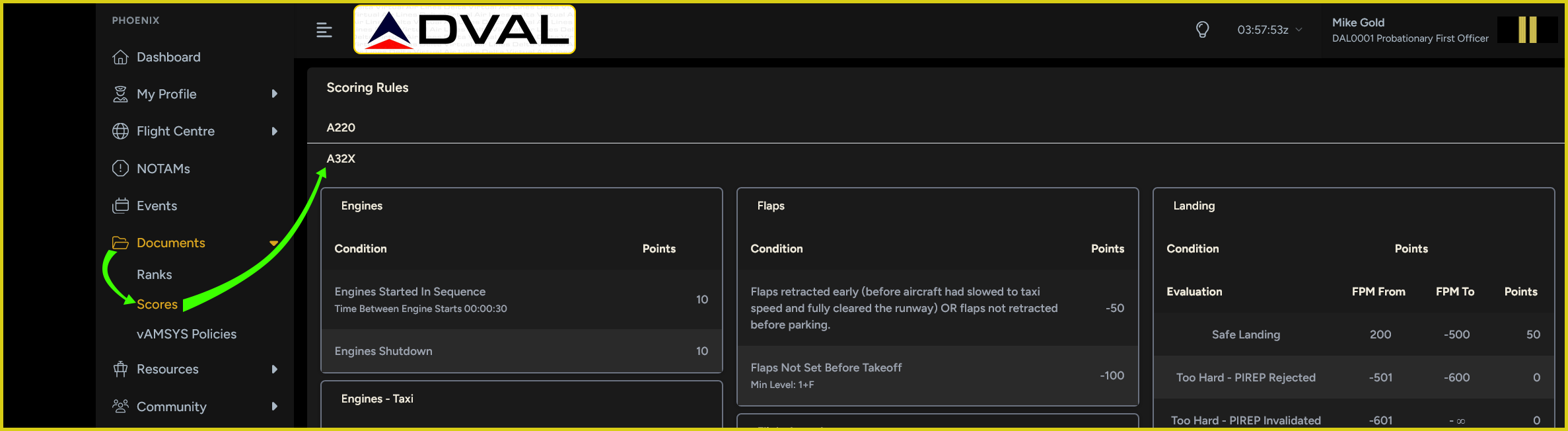 Demonstration of menu navigation to reach aircraft scoring rules.
There are some instances where a new or rare addon may flag events such as flap extensions with different values from what vAMSYS and Pegasus are currently configured to recognize and as a result may result in PIREPs being flagged with inaccurate violations. The admin and staff will catch as many of these as possible during review and will update the scorers to reflect these new variables whenever possible.
Pilots should view any positive points values as bonus points and any negative points as a required procedure. For example, Single-Engine Taxi should be done whenever it is practical to do so, but it is more important to ensure that the minimum engine warm-up or cool-down times are met than it is to attempt a single-engine taxi.
Section E - Event Types and Rewards
DVAL maintains a regular cadence of monthly focus city events in addition to more occasional, specialized events such as focus fleets, ATC event support, and VA-led events. The table below provides a description of each event type as well as the standard bonus point allocation for each type.
Event bonus points are applied to PIREPs as bonus points and are calculated as a percentage of the PIREP's regular points. For example, if the PIREP earned 200 regular points and qualified for bonus points from an event offering 200% bonus points, the final PIREP scoring would be 200 regular points and 400 bonus points.
Focus Airport
- Description: 3-4 airports are chosen on a monthly basis as focus airports. All flights in and out of these airports during that month are awarded bonus points.
- Reward: 100% of PIREP's regular points.
Focus Fleet
- Description: An aircraft fleet will occasionally be designated a focus fleet to encourage pilots to fly it, often after a new add-on launches. All flights with that fleet during the event period are awarded bonus points.
- Reward: 100% of PIREP's regular points.
Online ATC Network Event Support
- Description: Our events staff monitors online ATC networks -- primarily VATSIM -- for events that are relevant to our route network and seem like something our pilots are likely to participate in. These VA events line up with the actual event's start and end time and mirror the event's airport or airports. Participating flights must be online, and the flight must be dispatched in vAMSYS as online, in order to be awarded bonus points.
- Reward: 200% of PIREP's regular points.
VA-Led Custom Events
- Description: From time to time we will create custom events either for just one VA or the entire FVAA network to participate in. The theme and structure for these events can vary significantly.
- Reward: 300% of PIREP's regular points.
Other Events
- Fly the Line: For airlines where we have contacts who can provide examples of real crew's trips, we from time to time will set up a month-long event that replicates an actual pilot's hypothetical but realistic line for that month. These events require pilots to be members of our Discord server to receive the required information for the trip and are not frequent due to the workload involved. The bonus points awarded are usually based on the flight time of the trips in the line and how much of the line is completed.
- Tours: We are exploring utilizing the vAMSYS "Tour" functionality as an event type in the future. We have traditionally steered away from this type of event as it usually requires fictional routes to be invented, but we know it is generally popular with the flight simulation community and we are exploring how we can make it work for FVAA.