Chapter 3: Flight Planning and Operations
The information found below is not intended for real-world use and is for entertainment purposes only. Consult your manufacturer, operator, and/or local regulatory body for all operational requirements.
Section A - Flight Dispatch
Aircraft Picker
We ask, but do not require, that pilots book the same registration that they are going to fly.
We do require that the booked and flown aircraft types match.
When a pilot selects a flight to Dispatch, they will first need to select their aircraft. The fleets (aircraft types) available to select from, including Preferred Aircraft, will be limited if any fleet filters were available on the preceding screen, as well as being limited to just the aircraft types available on the selected flight.
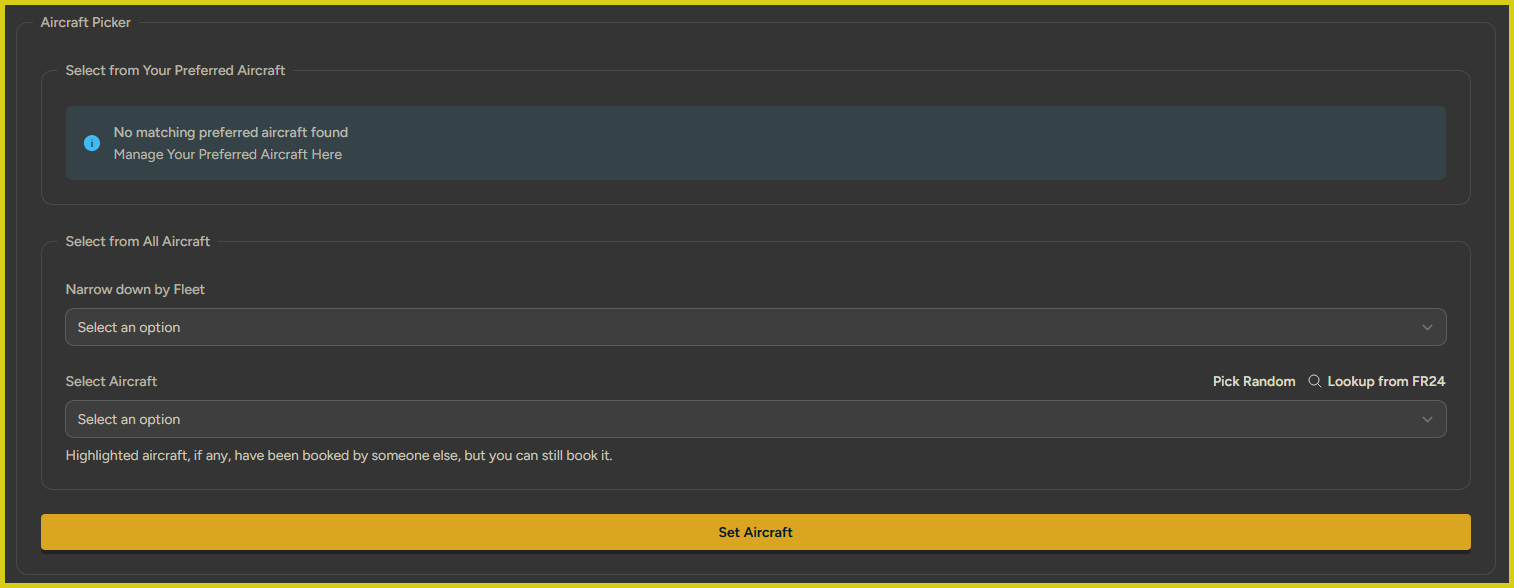
The Aircraft Picker prompt with no Preferred Aircraft set and no Fleet or Aircraft selected.
Select from Your Preferred Aircraft
This section will appear as it does in the screenshot above until/unless a pilot has selected a preferred aircraft within the aircraft types available on the flight that is being dispatched.
Multiple aircraft (registrations) can be selected per fleet.
In order to select a Preferred Aircraft, pilots can either click the link shown in the screenshot above -- "Manage Your Preferred Aircraft Here" -- or use the vAMSYS menu on the left-hand side of the screen and navigate to Resources -> Aircraft, and then click the star icon on the right side of each aircraft's row.
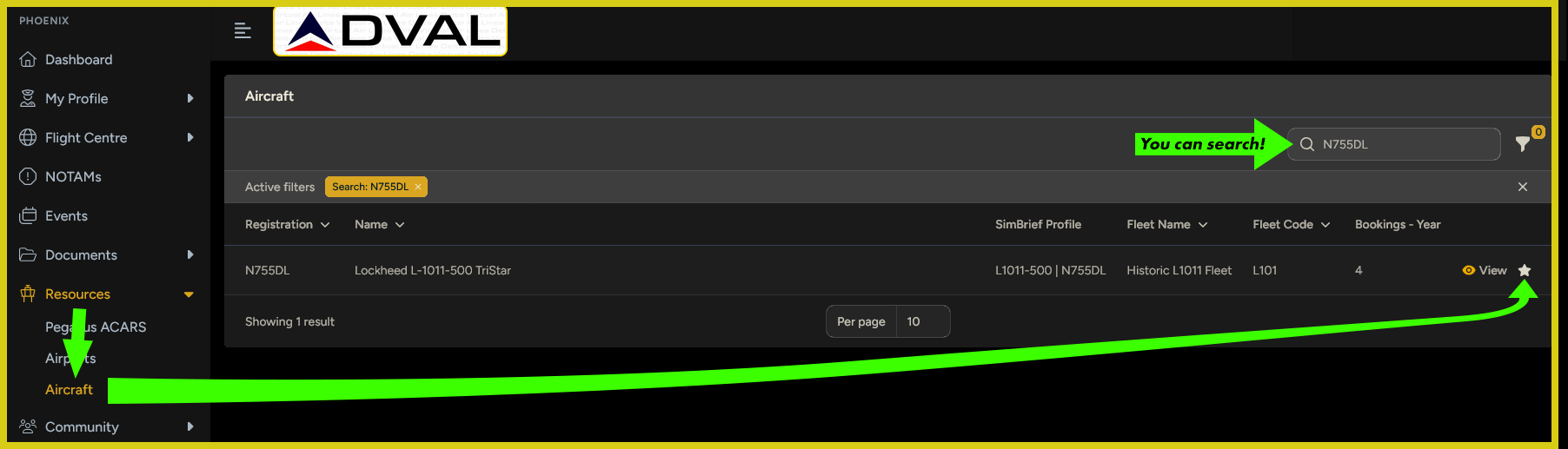
A demonstration of setting a Preferred Aircraft.
When an aircraft is selected, a pilot can chose an associated SimBrief Aircraft Profile for the aircraft. If the pilot has connected their SimBrief account to their vAMSYS account (My Profile -> Account Settings -> Social, Online & 3rd Party -> Navigraph) and they have Saved Airframes for the same aircraft type, those will also be avaiable to chose from.
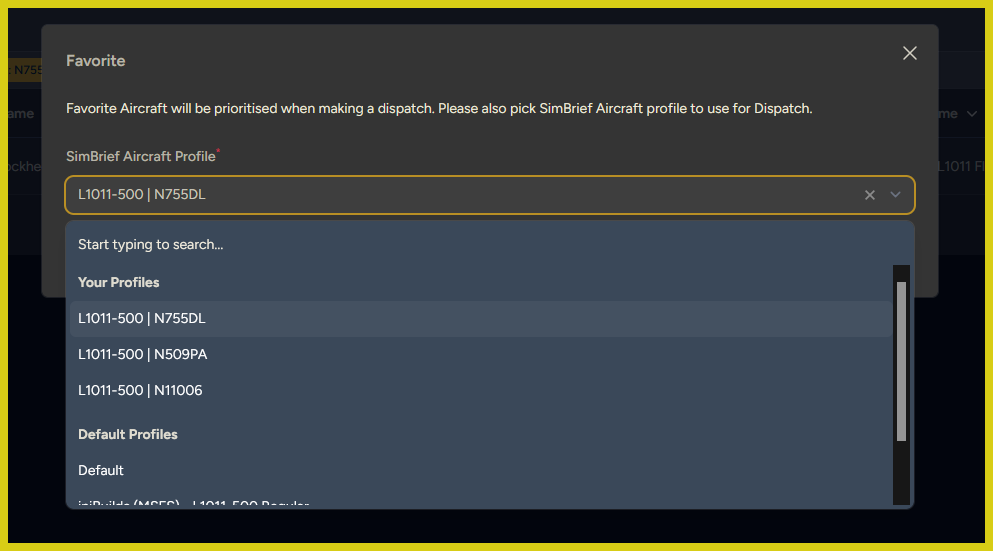
Selecting a SimBrief Aircraft Profile for a Preferred Aircraft
Once a Preferred Aircraft is set it can be selected during Dispatch if the flight being dispatched is one with the Preferred Aircraft's type available.
Select from All Aircraft
If the pilot does not wish to select a Preferred Aircraft, the Fleet and Aircraft can be selected below in the "Select from All Aircraft" box.
"Narrow down by Fleet" allows the pilot to select from the Fleets (aircraft types) available on the flight that is being Dispatched. If a type is not available, it cannot be flown.
"Select Aircraft" allows the pilot to select a specific aircraft/registration. The choices available in this dropdown will be narrowed down to the Fleet selected above, if any.
We ask, but do not require, that pilots book the same registration that they are going to fly.
We do require that the booked and flown aircraft types match.
"Pick Random" selects a random aircraft from the available Fleets on the route, and if a Fleet is selected in the field above it will select from that Fleet only.
Clicking "Pick Random" without a Fleet selected may result in a different Fleet being booked than you intend, potentially resulting in a mismatch between the booked aircraft type and the flown aircraft type. This in turn may result in PIREP rejection or invalidation. Be sure to double check the final aircraft selection matches the aircraft type you are going to fly.
"Lookup from FR24" will look up the last aircraft registration used on the route being dispatched. As real world schedules frequently change, and different aircraft types can operate the same flight on different days, this may result in an error where the aircraft found on FR24 is not an available aircraft type on the route. Additionally, this functionality is obviously not useful for historic flight schedules.
Dispatch Methods
DVAL urges all pilots to link their vAMSYS accounts to their SimBrief/Navigraph accounts by navigating in the left-hand menu in vAMSYS to My Profile -> Account Settings -> Social, Online & 3rd Party -> Navigraph.
This is required for many of the features discussed below to work properly.
Our pilots can take advantage of three different methods of planning and dispatching flights:
- Automated SimBrief Dispatch within vAMSYS
- Manual SimBrief Dispatch imported to vAMSYS
- Fully Manual Dispatch within vAMSYS
Automated SimBrief Dispatch
This dispatch method requires the "Dispatch via SimBrief" toggle switch to be toggled on:
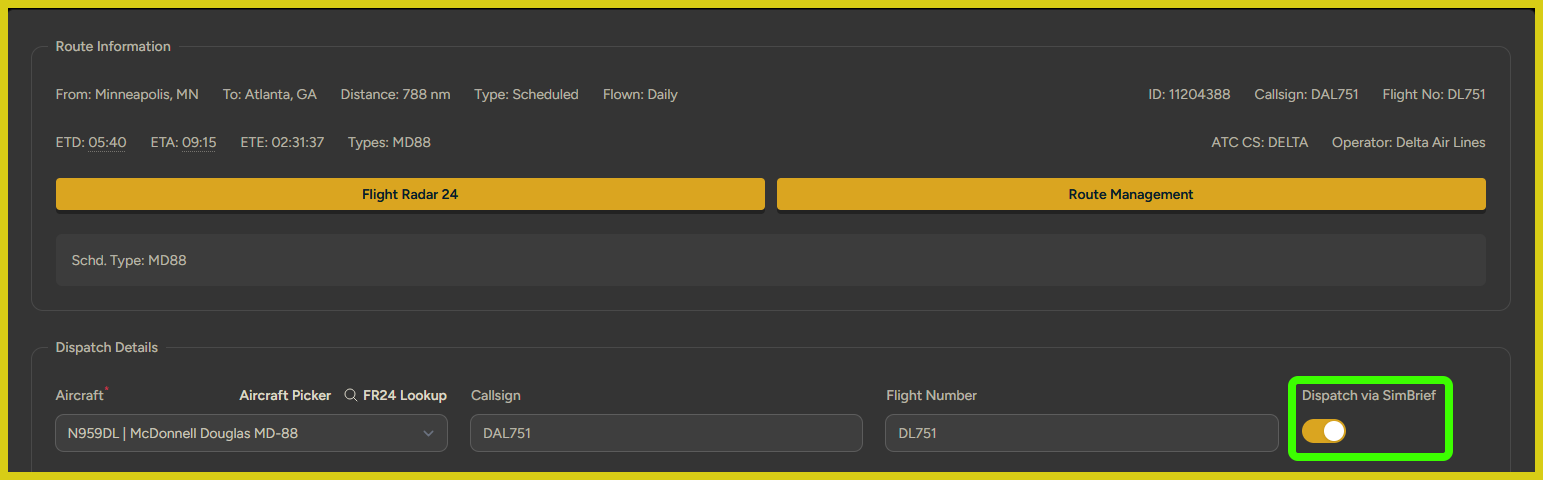 "Dispatch via SimBrief" toggled on.
Toggling "Dispatch via SimBrief" to On activates numerous fields in the Dispatch Details section mirroring the fields available when creating a flight plan in SimBrief. Recapping these fields herein would be duplicative, so we recommend pilots familiarize themselves with the SimBrief User Guide as a method of also familiarizing themselves with this.
Advantages of this method:
- Convenient, faster. Users stay within vAMSYS and are not required to move to a second window/tab.
- vAMSYS differentiates between "Passengers" (total number of passengers onboard) and "Passengers with Hold Luggage" (number of passengers with carryon baggage), which adds a granularity to the payload that cannot be achieved within SimBrief.
- Certain VA-defined overrides regarding fuel, alternates, etc., may be present for an operator, fleet, or specific aircraft that are automatically overriden by vAMSYS. This does not apply to DVAL at this time.
Disadvantages of this method:
- You cannot see/adjust/preview the route in real time. You can only see the route either after you have dispatched or, at the bottom of the screen, have clicked "Preview SimBrief Flight Plan" and then expanded the "SIMBRIEF OFP" section to view the actual pre-generated OFP.
- You lose the ability to utilize the "Route Calculator" functionality within SimBrief to generate more specific types of routes like such as "Legacy (VOR)".
- You lose the ability to utilize the "Calculate & Compare" functionality within SimBrief to adjust fuel loads on the fly.
Manual SimBrief Dispatch
While the Automated SimBrief Dispatch method is the recommended dispatch method of the vAMSYS platform/developer, DVAL feels that the user experience within SimBrief is still superior to the current vAMSYS integration, and DVAL also feels that the vAMSYS integration sacrifices some nuances of SimBrief's functionality in favor of the convenience of staying within vAMSYS.
As such, DVAL recommends the Manual SimBrief Dispatch method to our pilots.
This dispatch method relies on the "Dispatch via SimBrief" toggle switch to be toggled off:
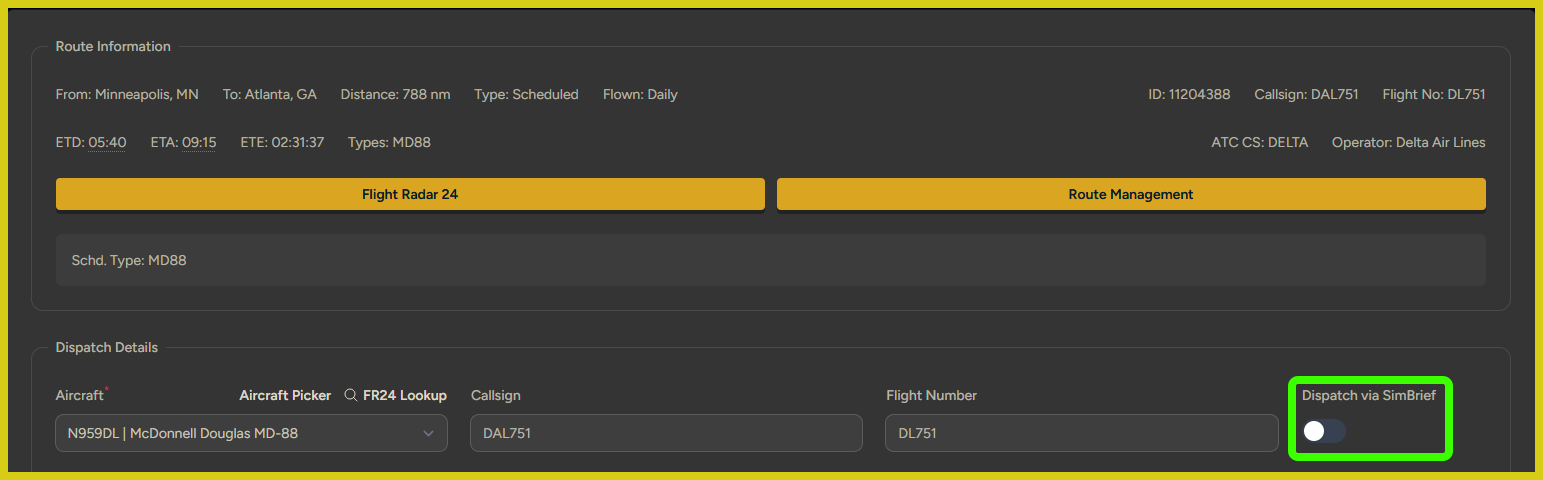 "Dispatch via SimBrief" toggled off.
Toggling "Dispatch via SimBrief" to Off deactivates the majority of the fields available on this screen as it removes the integration with SimBrief. For this dispatch method, the assumption is that the pilot is creating the booking within vAMSYS as a container, so to speak, for the OFP that will then be created in SimBrief. As such, once the aircraft type is selected, the only fields that need to be tweaked within vAMSYS are the Flight Options (Network if you plan to fly online and Shared cockpit Co-Pilot if applicable) and perhaps your departure time.
Once ready, click Create Booking and open SimBrief and create the flight plan as you normally would. Providing a full up tutorial for creating a flight plan in SimBrief is beyond the scope of this documentation, but pilots can reference the SimBrief User Guide or consult one of the many video tutorials available online, such as this one.
When you have created your flight plan/OFP within SimBrief, you will need to import it back into vAMSYS in order to fully populate your booking with the route, alternates, payload, fuel, etc., all of which will be used to review your PIREP and logged for your future reference as part of your PIREP history.
Click "Import From SimBrief" in your booking to import your completed SimBrief OFP back into vAMSYS.
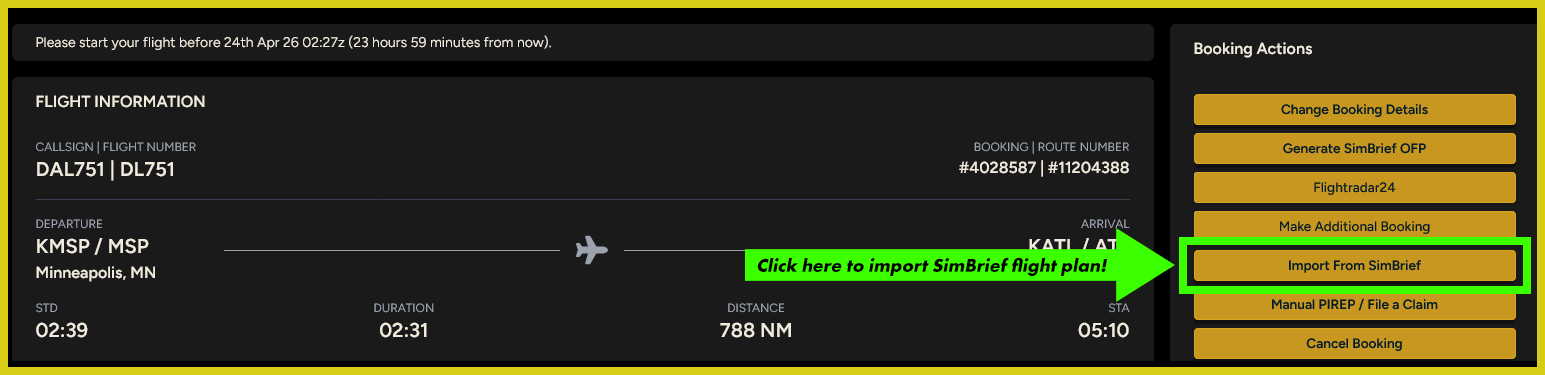 Click "Import From SimBrief" to import your flight plan.
Advantages of this method:
- Complete, granular control of your SimBrief OFP.
- Enables pilots to fine tune their routing, fuel parameters, and weights in real time and see the results via "Calculate & Compare".
- The SimBrief user interface is easier to use in this context.
Disadvantages of this method:
- Slower and less convenient. Requires users to go outside of vAMSYS to plan their flight.
- Any VA-defined overrides regarding fuel, alternates, etc., will need to be manually implemented. This does not apply to DVAL at this time.
Fully Manual Dispatch
This dispatch method relies on the "Dispatch via SimBrief" toggle switch to be toggled off:
"Dispatch via SimBrief" toggled off.
Toggling "Dispatch via SimBrief" to Off deactivates the majority of the fields available on this screen as it removes the integration with SimBrief. For this dispatch method, the assumption is that the pilot wishes to use flight planning software besides SimBrief. Therefore, the only parameters the booking/PIREP can contain are the ones in Dispatch Details. Nothing else can be imported once the booking is created.
Advantages of this method:
- None unless the user only wishes to use something like PFPX to plan their flight.
Disadvantages of this method:
- You lose the majority of the parameters that can be loaded into a PIREP for review and future reference that are available when utilizing SimBrief in one of the two prior methods.
Section B - Fuel Requirements
It is the responsibility of each pilot to ensure when planning their flight that they carry enough fuel to reach their destination, as well as fuel for any required alternates and/or contingency fuel.
Pegasus will detect any and all instances of fuel changes in-flight, and any PIREP with a fuel increase during flight is subject to immediate invalidation without appeal by the admin/staff team.
If a flight cannot be completed due to the fuel load, the pilot should divert to the closest company airport rather than increase fuel in flight. Diverting appropriately combined with an honest assessment in the required PIREP comment will upgrade the resulting PIREP from invalidation to rejection (hours granted, no points).
Cost Index
Most modern, major airlines do not use a fixed Cost Index (CI) and the CI will vary from flight to flight. As such, we recommend our pilots to utilize SimBrief's calculated Cost Index as that will provide the closest approximation to how flights are dispatched in the real world.
That being said, scheduled departure and arrival times are shown within vAMSYS and pilots are able to factor on time performance into their flight planning if they so choose.
When dispatching the flight, determine the scheduled time enroute by comparing the scheduled departure and arrival times, and plug that into SimBrief. vAMSYS will display a system calculated estimated time enroute that is usually close to, but not exactly, the actual scheduled enroute time. SimBrief's calculated time enroute is usually even farther off from the scheduled times than the vAMSYS calculation and plugging in the scheduled time enroute will provide a Cost Index that more accurately calculates the performance needed given the weather enroute, the departure time, and the scheduled time enroute, to make an on time arrival.
After departure, ensure that the route data in the FMS is as accurate as possible and reflects step climbs, en-route winds, anticipated arrival routing, and the planned approach procedure to the anticipated runway. Compare the resulting calculated ETA against the scheduled arrival time.
- If the calculated ETA is projected to be prior to the scheduled arrival time, reduce the cost index as much as conditions permit to move the calculated ETA as close to the scheduled arrival time as possible.
- If the calculated ETA is projected to be after the scheduled arrival time, increase the cost index as much as conditions permit to move the calculated ETA as close to the scheduled arrival time as possible (without jeopardizing required fuel reserves).
Alternate Airports
Takeoff Alternates
A takeoff alternate is required any time a flight is unable to return to the departure airport utilizing CAT I approach minimums. The airport must have a suitable approach available and the aircraft must be equipped for it.
Fleets capable of single-engine CAT II/III approaches retain that capability if the approach is available. However, the need for a takeoff alternate is determined using no lower than CAT I minimums.
Destination Alternates
A destination alternate must be planned when:
- Weather at the destination airport is below FAR 121.619 alternate requirements (1-2-3 Rule) and Exemption 10332 cannot be used,
- Thunderstorms are in the forecast, or
- Arriving at a European destination which has a single usable runway at the expected time of arrival (to include runway closures announced via NOTAM or other publication).
A second alternate should be avoided unless the primary alternate is marginal, or when convective activity could impact the ability to navigate to the primary alternate. Operationally suitable alternates should be chosen as close as possible to the destination.
1-2-3 Rule
No alternate is required if the destination forecast for ETA ± 1 hour (1-2-3) indicates the ceiling will be at least 2,000 feet (1-2-3) and the visibility will be at least 3 statute miles (1-2-3).
Exemption 10332 - CAT I
No alternate is required if the following criteria are met:
- For ETA ± 1 hour, the ceiling will be at least 1,000 feet.
- For ETA ± 1 hour, visibility will be at least 3 statute miles.
- For ETA ± 1 hour, thunderstorms are not reported or forecast at the destination airport.
- Operations are limited to airports with an operational CAT I approach.
- The ILS procedure has published minimums of 200 feet and RVR 2400 (1/2 statute mile) or lower and is available for use at the time of dispatch.
- Forecast winds will allow a CAT I approach to be used.
- The aircraft is CAT I capable.
Exemption 10332 - CAT II/III
No alternate is required if the following criteria are met:
- For ETA ± 1 hour, the ceiling will be at least 1,000 feet.
- For ETA ± 1 hour, visibility will be at least 2 statute miles.
- For ETA ± 1 hour, thunderstorms are not reported or forecast at the destination airport.
- Operations are limited to airports with an operational CAT II/III approach.
- Forecast winds will allow a CAT II/III approach to be used.
- The aircraft is CAT II/III capable.
Domestic Fuel Planning
All flights within the contiguous United States must be dispatched with enough fuel to a) reach the planned destination airport, b) fly to and land at the most distant alternate airport, if required, and c) to fly for 45 additional minutes at normal cruising fuel consumption.
When no alternate is required, all flights should be dispatched with a minimum of 25 minutes contingency fuel.
International (Flag) Fuel Reserves
Any flights with the departure or arrival airport outside of the contiguous United States must be dispatched with enough fuel to a) reach the planned destination airport, b) fly for a period of 10% of the total time required to fly from the departure airport to the arrival airport, c) fly to and land at the most distant alternate airport included in the dispatched flight plan, and d) fly for thirty (30) minutes at holding speed at 1,500 feet above the alternate airport under standard weather conditions.
When no alternate is required, all flights should be dispatched with a minimum of 25 minutes contingency fuel.
Weather Minima
A flight may not depart if the arrival airport is forecast to have visibility below the published approach minimums at the time of arrival. The lowest applicable approach minimums for dispatch to the destination will be the published minimums for the highest category approach that the aircraft is capable of, and that the forecast winds at the estimated time of arrival will allow.
Note that if after departure the weather at the destination airport has deteriorated below the originally met dispatch minimums, the flight can still proceed to the destination and does not need to automatically divert. This is discussed in more detail in Section F - Approach and Landing.
Section C - Departure
Departure Briefing (WARTS)
The acronym WARTS identifies each major category to review when completing a departure brief:
- W: Weather/wind considerations
- A: Abnormal/non-normal procedures and abort considerations
- R: Runway considerations
- T: Taxi and terrain considerations, transition altitude/height (if applicable)
- S: SID/Departure considerations
The following items in WARTS should be briefed when applicable:
- Weather/wind considerations
- Takeoff minimums/alternate requirements
- Windshear/gusty/crosswind/tailwind considerations
- Cold weather procedures
- Low visibility taxi/takeoff procedures
- When visibility is less than RVR 1200, review Surface Movement Guidance & Control System (SMGCS) Low Visibility Taxi Routes Chart, if applicable
- Abnormal/non-normal procedures and abort considerations
- Rejected takeoff plan, to include reasons for rejecting the takeoff and crew duties
- MEL review, if applicable
- Runway considerations
- Runway length and surface conditions
- Likely runway to use in the event of a return to field
- Taxi/Terrain/Transition Altitude
- Taxi plan. The airport diagram (e.g., 10-9) is the primary reference for ground operations.
- Hot spots
- Hold short points
- Abnormalities (NOTAMs, Jeppesen construction page, flight plan remarks, etc.)
- Anticipated runway crossings
- Engine start sequence
- Terrain considerations, if applicable
- Transition altitude/height if other than 18,000 feet
- SID/Departure considerations
- SID/Departure
- Departure airspeed and altitude restrictions
- Navigation and radio management
- Automation
- Engine out procedures (if available)
Section D - Enroute
Diversions
If it is necessary to divert, make every effort to divert to an airport that is in the company's network. If you do not know what airport that is, Pegasus will display the nearest company airport. However, if the issue is severe enough to warrant it, you can also divert to the nearest suitable airport.
For a diversion to a company airport, vAMSYS will automatically book a temporary, one-off flight to the intended arrival airport, allowing the pilot to complete the original trip. If, after diverting, the pilot jumpseats to another airport, that flight will no longer be available.
For a diversion to a non-company airport, vAMSYS will provide the pilot with two options: 1) move the pilot to the intended arrival airport or 2) move the pilot to the original departure airport.
Section E - Arrival
Arrival Briefing (NATS)
The acronym NATS identifies each major category of the approach briefing. For all approaches, the pilot flying should consider and brief these items.
- N: NOTAMs
- A: Arrival/Approach Chart/Automation
- T: Transition level/height/Terrain/Taxi
- S: Specific Company Information (if available)
If an approach is to be flown in actual instrument conditions or night VMC:
- Conduct a full approach plate briefing
- Review the relevant items of the NATS brief
If the approach is flown in day VMC, review the relevant items of the NATS brief.
If a runway change occurs and the approach briefing has been completed, re-brief the approach accordingly:
- Positive confirmation of the new runway must be established
- Re-tune navigation aids and set the inbound course
- Confirm the FMS is programmed correctly
- Altimeter bugs may need to be changed to reflect a modified approach clearance to the same runway
Section F - Approach and Landing
Stabilized Approaches
The stabilized approach scorer in vAMSYS is very binary and we are not able to implement any tolerances to reflect some of the flexibility granted to crews in the real world. We have been lobbying vAMSYS to add tolerances to this scorer, and if that functionality is added, we will implement it immediately.
Keep in mind that until those tolerances are added, this scorer will remain very binary and inflexible. If you suspect you are going to end up with an unstable approach that you disagree with, it is up to you to either decide to go around or decide that you are okay with living with the points deduction. We will not entertain any requests for leniency for scored unstable approaches due to the administrative load this would create.
All PIREPs will be scored for stable or unstable approaches. A stable approach will result in an award of 50 base points for the relevant PIREP; an unstable approach will be penalized with a deduction -75 base points on the relevant PIREP.
If any of the Stabilized Approach Criteria outlined below are broken/not met, a Go Around must be executed and an additional approach must be made. If an unstable approach results in a Go Around before the aircraft has touched down, the stabilized approach scorer will reset and only the final, full-stop landing will be judged.
Stabilized Approach Criteria
At 2000 Feet Above Field Elevation:- Descent rate cannot exceed -2000 feet per minute.
- Landing gear must be extended and flaps set to their final configuration.
- Descent rate cannot exceed -1000 feet per minute.
- No configuration changes permitted.
Landing Minimums
In order to descend below DA/MDA, the following requirements must be met:
- The aircraft must be continuously in a position to make a safe landing within the touchdown zone.
- The flight visibility must not be less than that prescribed by the approach being flown.
- If the pilot has the approach lights in sight, a descent may be made to 100 feet above TDZE, except if the red terminating bars or red side row bars are visible, in which case the pilot may descend further, but may not land until another element of the runway environment is in sight.
- Except for Category II or III approaches, the pilot must have the runway environment in sight.
All pilots must observe the following landing minimums:
- Localizer/VOR: Charted minimums.
- RNAV: Charted minimums.
- NDB: Ceiling not below MDA. VIS 2 SM (3,200 meters).
- Visual/Circling: Ceiling not below 1,000 feet AGL, VIS 3 SM (4,800 meters).
- ILS CAT I: Visibility 1/2 SM (800 meters) or RVR 1800 feet (550 meters). Decision height 200 feet AGL.
- ILS CAT II: RVR 1,000 feet (300 meters meters). Decision height 100 feet AGL.
- ILS CAT IIIA: RVR 700 feet (200 meters). Autoland mandatory. Alert height (not DH) set to 100 feet AGL. B737NG mandatory DH of 50 feet AGL.
- ILS CAT IIIB: RVR 300 feet (100 meters). Autoland mandatory. Alert height (not DH) set to 100 feet AGL. B737NG minimum RVR 600 feet (175 meters).
Go Arounds, Balked Landings, and Multiple Recorded Landing Rates
Definitions:- A "Go Around" is when an approach is abandoned and the flight either conducts an additional approach or diverts to another airport.
- A "Balked Landing" (sometimes spelled "baulked") usually refers to a landing where the crew elects to take back off after touchdown has occurred, but can also refer to a Go Around executed from a very low height above the runway.
In other words, all Balked Landings are Go Arounds, but not all Go Arounds are Balked Landings.
If you cannot stabilize your approach, or your approach becomes unstable, you may Go Around and the Stabilized Approach scorer will reset. The Stabilized Approach scorer only counts the approach prior to your final landing.
If Pegasus detects multiple landing rates, whether they are from multiple landings on the same PIREP or because you bounced upon landing and the bounce lifted you into the air long enough for Pegasus to detect an additional landing rate, your PIREP is sent for review where a) you will be required to leave a reply explaining the circumstances and b) staff will select the landing rate to count for the purpose of PIREP scoring.
We always select the hardest recorded landing rate as this represents the maximum force felt by the airframe.
So, if you touch down, realize that it was a hard landing, and elect to execute a Balked Landing and take back off to make another approach/landing, please keep in mind that you are not getting a "do over" on your landing rate. If the first landing rate was the hardest landing rate, that is the landing rate that will count.