Chapter 2: General Operations and Policies
Knowledge and Competency
Generally speaking, joining a virtual airline is not a recommended first step for people new to the world of flight simulation and commercial aviation. The purpose of a virtual airline is to add a layer of structure and “gamification” to the open ended, open world nature of at home flight simulators.
We do not expect our members to know everything and we do not expect our members to come to us with the knowledge and skill set of a fully trained real world airline pilot. However, we do expect a certain baseline of knowledge as to how a commercial airline flight is legally operated as well as a willingness to learn and pursue self-study.
In time, we hope to offer some kind of training programs for our membership once our structure is more robust. We cannot offer that at this time, but we are always happy to field questions, and we hope all members will ensure that they have read and understand this document before they begin booking flights and filing PIREPs.
We want to strike a happy medium. If all you want is a flight tracker that has no restrictions, then something like Volanta, SimToolKitPro, etc. is more of what you’re looking for. We strive to not be stifling with our requirements; we want to be realistic where it matters and relaxed everywhere else. PIREPs will be rejected or invalidated if we see things that do not follow the requirements found here in the FOM, but we will also offer feedback and invite people to seek advice if they are struggling with some aspect of procedure or technique.
As always, if in doubt please ask questions prior to booking a flight and filing a PIREP, it’s much easier to prevent PIREPs being rejected or invalidated that way. Our Discord is the best place for this (invite link on your vAMSYS dashboard) but you can also reach us at asa@fusionvaa.com.
Welcome!
Activity Requirements
At vASA we ask all pilots to file 1 PIREP over a rolling 120-day period.
After 120 days without a PIREP have passed and the activity rule has been triggered, pilots will have a grace period of 10 additional days to bring their account active.
In addition, we ask all new pilots to file 1 PIREP, which has status of 'Complete' or 'Accepted', within 10 days of registration.
PIREPs must be filed via Pegasus to count towards the activity requirement.
Rejected and Invalidated PIREPs do not count towards the activity requirement.
If a pilot’s account is removed due to inactivity, their PIREP history will not be lost and the account is not deleted. Pilots can re-register with the VA by following the registration link on the vASA website -- this will reactivate and restore their account. Reach out to us via Discord or at asa@fusionvaa.com if you run into any issues reactivating an inactive account.
We do not and will likely never be able to support console/mobile users. It is unlikely that compatible ACARS clients will ever be developed for console/mobile flight simulators.
Holidays
vAMSYS includes a holiday function which allows pilots a period of time during which the Activity Requirements no longer apply. vASA gives pilots an allotment of 180 days per year of holiday time.
To be eligible, the pilot’s account must be older than 10 days – thus, they must have met the New Hire Activity Requirements.
Holidays can be requested by opening the "My Profile" menu on the left hand navigation menu in vAMSYS and selecting "Preferences" from the dropdown box. On the screen that subsequently opens, you will find the Holidays section in the middle of the page, where the amount of time available to you will be listed above the "Book Holiday" button. Clicking "Book Holiday" will open up a prompt where you can select the start and end dates for the holiday period.
Once submitted, your holiday time will appear in the "Your Holidays" section immediately below, where you can see the start and end dates, status, and a "Delete" button where you can remove/cancel the holiday period.
While on holiday, flights cannot be booked. The holiday period can be cancelled at any time and unused days will be returned to the holiday allotment.
Ranks
To provide a sense of career progression, vASA has several tiers of ranks which pilots will progress through as they accrue hours, points, and bonus points from their PIREPs.
At this time, vAMSYS does not allow routes or aircraft types to be rank limited; thus, pilots can fly any aircraft and route (providing all livery and aircraft type requirements are followed) regardless of their rank.
There are Honorary/Staff ranks which will be disbursed at the sole discretion of the admin team for certain purposes. These cannot be qualified for independently or requested.
| Rank | Abbreviation | Hours | Points | Bonus Points | PIREPs |
|---|---|---|---|---|---|
| Probationary First Officer | FO | -- | -- | -- | -- |
| First Officer | FO | 100 | 11,500 | 6,500 | 50 |
| Captain | CA | 275 | 31,500 | 18,000 | 100 |
| Line Check Airman | LCKA | 750 | 100,000 | 50,000 | 300 |
Transfer Hours
You must apply for a rank transfer before you have filed your first PIREP. After you have filed your first PIREP, the rank transfer functionality becomes unavailable and this cannot be overridden by staff.
Hours may be transferred from any other Alaska Airlines-based virtual airline whether it is on vAMSYS or another platform. Time will not be accepted from virtual airlines based on any other airlines, including within the FVAA network.
Please note that we do not allow you to transfer hours over 1:1. Instead, we allow new members to transfer into the First Officer rank if they meet our requirement of 100 hours. If the new member has less than 100 hours with another Alaska-based VA, a rank transfer is not relevant for them. If they have hours that are above our requirements for Captain or Line Check Airman, they will still be transferred into the First Officer rank.
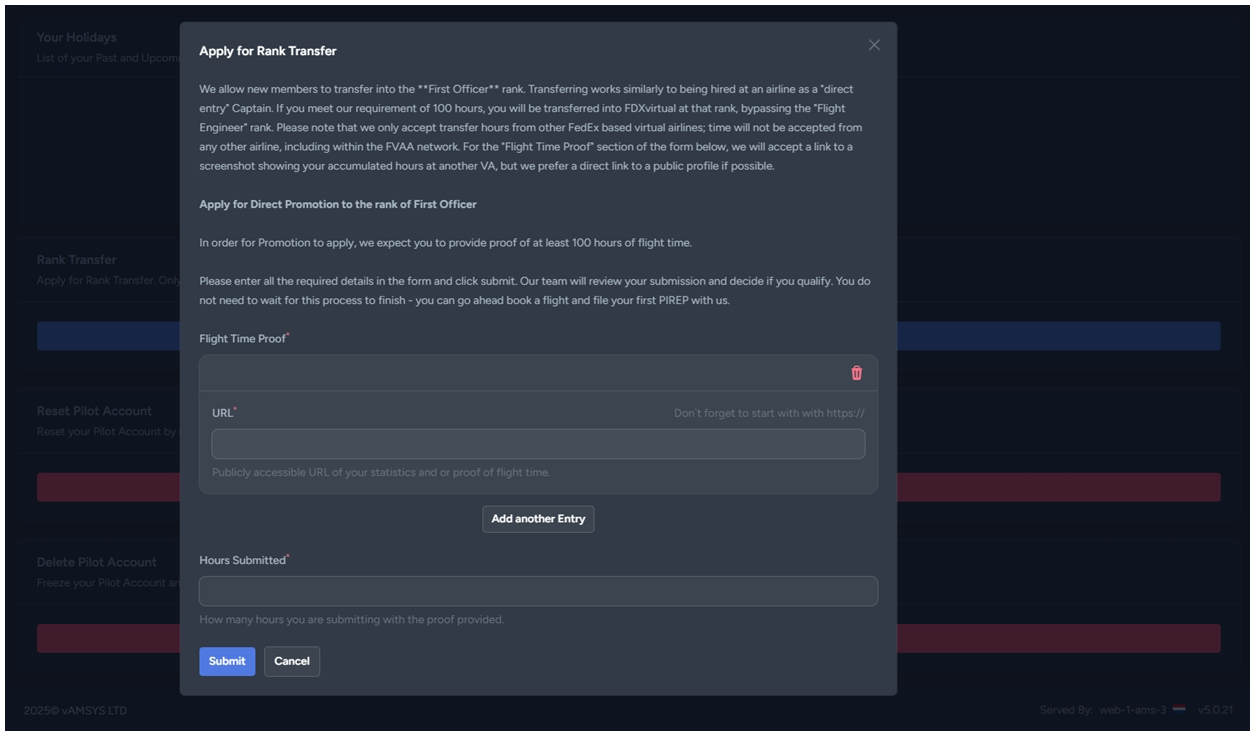
In order to apply for a rank transfer, before you have filed your first PIREP, click "My Profile" in the left-hand navigation menu in vAMSYS and then select "Preferences" from the drop-down menu. On the screen that subsequently opens, you will find the "Rank Transfer" section below the Holidays sections. Clicking "Apply for Rank Transfer" will open a window that explains our policy and provides a form to collect the required information.
Please note that for "Flight Time Proof" that you can link to both a publicly accessible URL of your previous Alaska-based virtual airline's statistics for your flight history or you may link to a screenshot showing the same.
Group Flights and Online Networks
We encourage, but do not require, pilots to utilize VATSIM and other online networks, and from time to time we may organize group flights which will usually be online and sometimes may be done along with a YouTube/Twitch streamer.
In all scenarios we require pilots to firstly comply entirely with the policies of the platform(s) in use as they are representing vASA. Any pilots who are found to have violated any of these policies will be subject to disciplinary action up to and including permanent removal of their account.
Secondly, we require pilots to follow our own Code of Conduct and Bylaws as we do in any offline vASA activity. Any pilots who are found to have violated any of these policies will be subject to disciplinary action up to and including permanent removal of their account.
Finally, we require pilots to follow the procedures found in this document and any future checklists, AOM/FCOMs, etc. that may be released, while flying with others or online. In representing vASA you represent the abilities and qualities we wish to be known for, and your example is what others will judge us by. For that reason, we ask that pilots wait to fly online until they are confident in their ability to correctly operate their aircraft and to follow ATC instructions. We encourage anyone to seek guidance and tutoring if they need assistance. Repeated instances of immature or incompetent behavior online will be subject to disciplinary action up to and including permanent removal of their account.
If the callsign of your booked flight is already in use on the network, you may either use your pilot ID number in lieu of the flight number, or you may append a trailing letter to the flight number. For example, if ASA123 is in use on the network and your pilot ID is ASA1014, you may use ASA1014 on the network, or you can use ASA123A. Likewise, if flying a historic, non-ASA flight, you can append your flight number to that operator's code -- e.g., VRD1014 for someone with a vASA ID of ASA1014, etc. Use of the pilot ID is preferred.
Flight Tracking
Time Acceleration
Time Acceleration during a flight is prohibited without exception; PIREPs flagged for time acceleration will be invalidated.
Slewing
Slewing during a flight is prohibited without exception; PIREPs where slewing is seen after pushback will be invalidated.
Pausing
Pausing is allowed during a flight.
PIREPs that have over sixty (60) minutes of cumulative time paused will be sent for manual review by staff – please leave a comment explaining the reason for the long pause time. We will almost certainly approve the PIREP.
However, we do ask pilots to not pause excessively. This is a policy we are still trying to develop, so for the time being it is a judgment call by the staff as to whether or not someone is abusing pausing during flights.
Generally speaking, we ask that a flight be completed during one “sitting” — essentially during the same day. Alaska/Hawaiian do, however, operate long range flights that are 8+ hours of flight time. In the real world, those flights are operated with extra crewmembers to allow the crew to take rest breaks. It would be unrealistic for us to not allow the same. Pilots are allowed to leave the simulator running overnight and take advantage of "Pause at TOD" functionality to resume their flight in the morning. We do ask that pilots try to plan these flights so that they can resume the flight at TOD without too significant of a delay. For example, if an overnight flight is going to require the simulator to be paused for a full workday and the flight completed in the evening, we may ask pilots to stop that behavior if it becomes a pattern.
We understand that plans can change after a flight has been started, so we are flexible on this point, but if something changes after you’ve started a flight to where you will have to leave the simulator paused for a long time before you can complete the flight, we recommend you instead abandon the flight and restart it later when you can complete it in a more appropriate amount of time.
The reasoning behind our caution around pausing is twofold: One, we have seen cases where a flight being paused can corrupt Pegasus's tracking, garbling or interrupting the PIREP log or causing it to never come out of the paused state to track the rest of the flight, and there is no way for us to fix this on our side. The longer a flight remains paused, the more likely a problem like this is to occur. The vAMSYS team keeps Pegasus in active development to identify and correct bugs, so this is not an inherent problem in Pegasus that will never be addressed, we are being proactive in helping you avoid frustration in the relatively unlikely case this happens.
Two, particularly with MSFS, active pause can cause the aircraft to freeze in position while the flight time clock continues to run, incorrectly and unfairly inflating the flight time for that PIREP, which creates an opportunity to abuse the system to quickly accrue unearned hours. Active pause doesn’t always do this, but we do see it fairly regularly and when we see PIREPs where this happened they are invalidated. Staying paused in MSFS, depending on the add-on and the type of pause used, can also continue burning fuel while paused, causing the aircraft to refuel itself when unpaused, or alternatively cause a complete failure of both engines and the aircraft's systems. This creates an unrealistic and messy scenario to recover from that is not appropriate for an approved PIREP.
Starting and Ending Locations
A flight must begin and end at either a gate or a remote stand in a cold and dark or turnaround power state. Please do not start a flight on a runway or taxiway or with the aircraft powered up with engines on.
We understand that it is possible to sometimes forget to start Pegasus tracking at the gate, so within reason we are fine with tracking being started before takeoff. If we notice a trend of this happening we will inquire and PIREPs may be rejected or invalidated as a result.
PIREPs
Requirements for Approval
To be approved, a PIREP must meet the following criteria:
- You must book the same type of aircraft that you will fly.
- You must use an appropriate livery for the aircraft type.
- Your landing rate must be under -500 fpm to receive points and log hours, or under -600 fpm to receive no points and log hours only.
- You must have taken off and landed with an appropriate fuel load for the flight with no fuel added in flight/after pushback.
- You must not have used used slew mode after pushback or used time acceleration during the flight.
- You must have used an appropriate route for the flight and completed the flight in an appropriate amount of logged flight time without extensive detours or obvious departures from the route due to being lost or negligently managing the autopilot, etc.
- You must depart from and arrive at the booked origin and departure airports. In-flight diversions are allowed with a valid reason.
- Staff reserve the right to reject or invalidate PIREPs for any departures from controlled flight or good airmanship not specifically outlined above, but those situations are rare.
Processing Statuses
All PIREPs are processed automatically when submitted and may take up to ten (10) minutes to be processed by the system. In certain circumstances, which will be discussed in more detail later, a PIREP will fail automatic scoring and will require a manual review by the admin and staff team. A manual review can take longer, up to a week in some circumstances, but every attempt is made to go through the manual review queue several times per week.
Once processed by the automatic scorer, the PIREP will receive one of six statuses. These are:
- Accepted: PIREP has passed automated scoring and is now complete.
- Awaiting Review: PIREP has failed automated scoring and requires manual review.
- Rejected: PIREP will grant hours to the pilot but no points.
- Invalidated: PIREP will grant neither hours nor points.
- Processing: PIREP is undergoing processing.
- Reply Needed: PIREP needs your input prior to review by the staff team.
It is important to understand that having PIREPs sitting in the review queue does not prevent you from booking and flying additional flights. The system may require a reply on a PIREP — see the following section — before it lets you book a flight, but once all PIREPs that require it have been replied to, you can book a new flight and continue flying. Our team will review PIREPs that are sent for manual review as soon as possible, but keep in mind that review times are dependent on staff availability.
Reply Needed
PIREPs with the status of Reply Needed require prompt attention by the pilot, who will not be able to book or start a new flight until they leave a response on the PIREP. No notification will be sent via email; the next time the pilot tries to book a flight they will be prevented from doing so and instead will see the following:
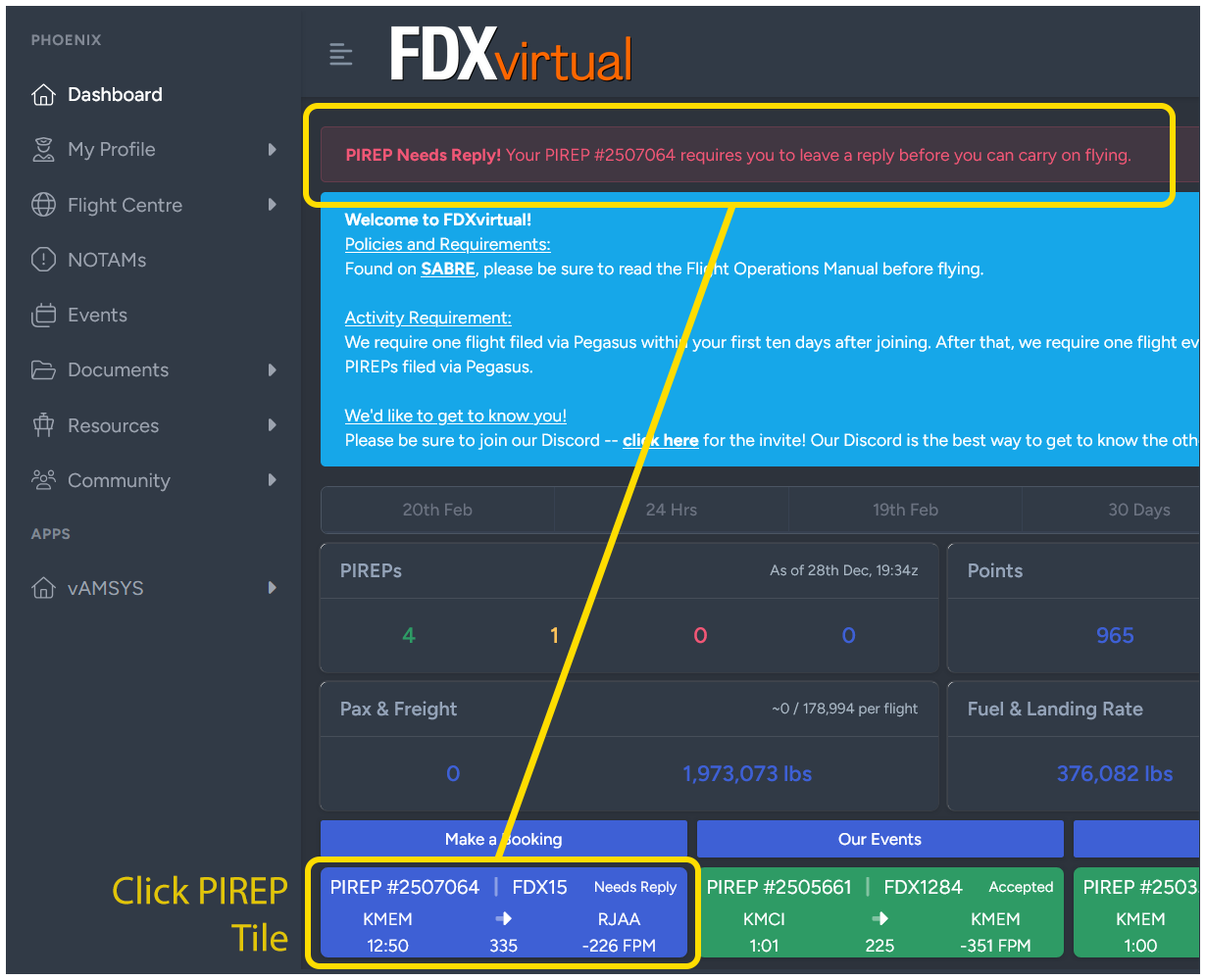 Screenshot taken from another Fusion VA's FOM, FDXvirtual
Clicking on the relevant PIREP tile will take the pilot to the PIREP Details screen for the PIREP that requires a comment.
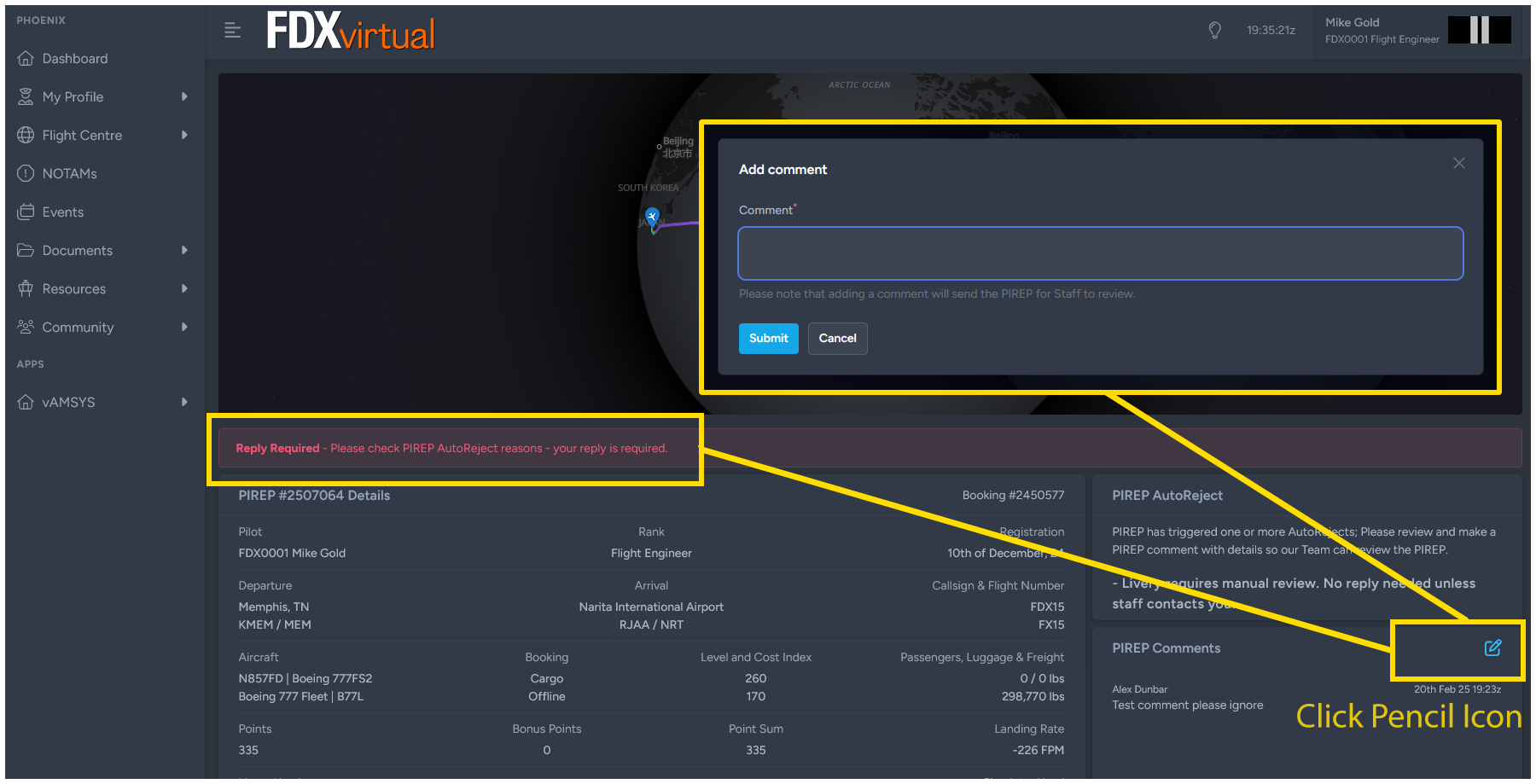 Screenshot taken from another Fusion VA's FOM, FDXvirtual
Review the comment left by staff in the PIREP Comments section and then leave a reply addressing the staff comment by clicking the Pencil-and-Paper icon and adding a reply. Once this is done, the PIREP will be sent back into the PIREP review queue for staff to review your reply and you will then be able to book additional flights and continue flying.
Please note that rejections or invalidations of PIREPs due to landing rates are not up for negotiation. We apply these rules universally, regardless of alleged circumstances. Leaving a comment claiming a gust of wind, low frame rates, or some other extenuating circumstances caused the hard landing only risks a PIREP's review being further delayed as it will move the PIREP into the manual review queue. It is best to just accept the situation, learn from it, and seek to further refine your landing technique.
Common Causes of Manual PIREP Review
| Name | Condition | Action |
|---|---|---|
| Livery flagged for review. No reply needed unless contacted. See FOM for more information. | See next section | Sent for manual staff review. Reply not needed unless we ask. |
| Livery automatically rejected. Contact staff with questions or see FOM. | See next section | Sent for manual staff review. Reply not needed unless we ask. |
| Longer than anticipated flight length. Please leave a comment if anything unusual delayed the flight. | Flight took longer than average or scheduled time by more than 25% or 30 extra minutes. | Sent for manual staff review. Reply not needed unless we ask. |
| Time acceleration detected. PIREP may be invalidated, please leave a comment. | - | Sent for manual staff review. Pilot reply required. Likely invaldiation. |
| Fuel increase detected during flight. PIREP may be invalidated, please leave a comment. | - | Sent for manual staff review. Pilot reply required. Likely invaldiation. |
| Flight paused over 60 cumulative minutes, please leave a comment stating the reason. | - | Sent for manual staff review. Pilot reply required. Likely approval. |
| Landing rate over -500 fpm, PIREP rejected (hours granted, no points). | Landing rate greater than -500fpm. | Rejected (hours kept, no points granted) with no exceptions. |
| Landing rate over -600 fpm, PIREP invalidated (no hours or points granted). | Landing rate greater than -600fpm. | Invalidated (neither hours nor points granted) with no exceptions. |
| Diversion detected, please state reason for diversion. | Flight landed at an airport other than the booked destination. | Sent for manual staff review. Pilot reply required. Approval contingent on scenario/appropriateness of diversion. |
| Multiple landings or large bounce detected, please describe the cause. | - | Sent for manual staff review. Pilot reply required. Likely approval. |
| Negative points, please review PIREP and leave any information relevant to cause(s). | - | Sent for manual staff review. Pilot reply required. Likely invaldiation. |
Claims
Due to the great potential of abuse, you may only submit one (1) Claim per calendar month.
Please note that abuse of this system may result in rejection of subsequent Claims and/or PIREPs filed with Pegasus and may result in permanent removal from vASA.
Because it might not always be possible to file PIREPs via Pegasus, vAMSYS provides the ability to file a PIREP Claim. However, we do not allow the Claims system to be used as a manual PIREP system or in lieu of using Pegasus. All PIREPs should be tracked and submitted via Pegasus, the Claims system is a fallback option only.
You may file a claim by clicking the blue active booking tile on the vAMSYS Dashboard and then from the booking screen selecting the "Manual PIREP / File a Claim" option under Booking Actions. You will be required to include proof that your flight took place, information on accepted forms of proof is below.
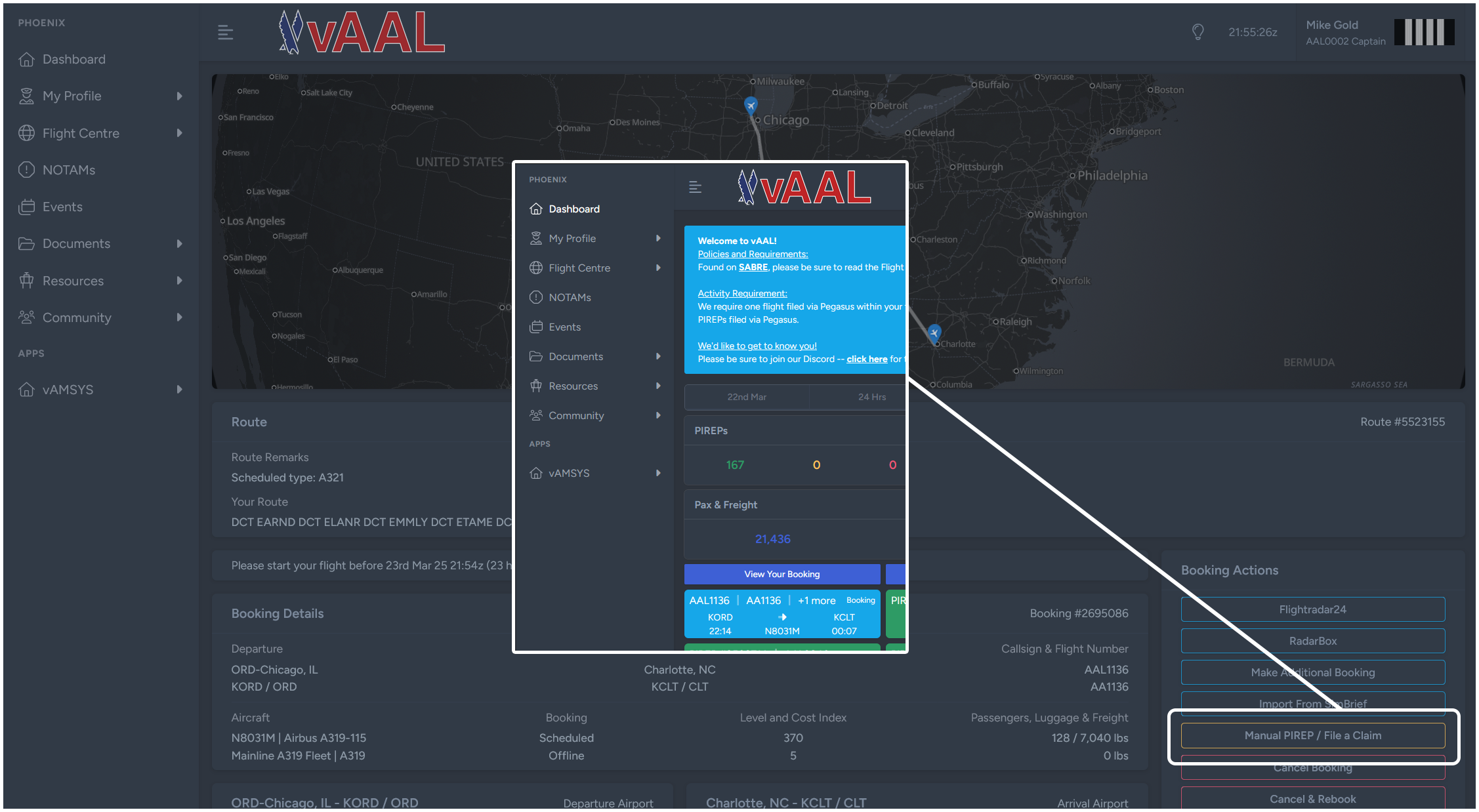 Screenshot taken from another Fusion VA's FOM, vAAL
You should only use this function if Pegasus crashed during your flight or if you cannot otherwise file a PIREP via Pegasus for a flight you began tracking with Pegasus. You may also file a Claim if you fail to track your flight in Pegasus, provided you can provide proof that the flight took place.
In the event of a simulator crash during the flight, please try to recover the flight should you use a tool -- such as Volanta Premium -- or add-on that allows you to recover a saved flight. If that is not possible, a claim can be filed if:
- The flight crashed after 80% of the flight had been completed (measured against the scheduled flight time);
- Some kind of proof of flight can be included showing the progress of the flight up to the point of the simulator crash.
Proof of Flight
You are requried to attach proof that the flight occurred to your claim. This can either be an image or a link.
Acceptable forms of proof:- A screenshot of Pegasus showing the ACARS page with the flight time and log.
- A screenshot of Volanta, STKP, etc. showing the flight's statistics including the aircraft type, flight time, landing rate, etc.
- A link to the flight's history on https://stats.vatsim.net/
- A link to the flight's history on Volanta, STKP, etc.
- A screenshot of or link to the flight's history captured by any other 3rd party platform similar to the tools discussed above.
- A screenshot of the cockpit.
- A screenshot of a 3rd party tracking tool that includes no information about the flight other than the flight path.
- A screenshot of another VA's ACARS client.
- No proof at all.
- Any screenshot or link to any kind of tool or evidence that does not display enough information to validate flight time, aircraft type, etc.
Landing Rates
It has become fashionable in the flight simulation community to pursue landing rates as low as possible. While a smooth landing is satisfying to pilots both real and virtual, it is not advantageous or safe to pursue a landing with a low vertical speed as the top priority.
To discourage this behavior, we have made our landing rate scorer binary – your landing was safe (less than 500 fpm), or it wasn’t (greater than 600 fpm). Between 500 and 600 fpm your PIREP will be rejected (hours granted but no points) while PIREPs greater than 600 fpm will be invalidated (no hours or points granted).
We recommend you target a consistent landing rate between -150 and -300 fpm.
Liveries
It is important to understand that as far as vAMSYS is concerned, a "livery" is more than the paint job on the airplane -- vAMSYS considers a livery to be the paint job on the outside of the airplane plus the aircraft type you booked plus the aircraft type you flew. Each time a livery is used it is reviewed as a combined entity and if it doesn't match in any category, the livery is rejected.
It is also important to understand that a previously approved livery may be flagged for review again in the future. An update to the addon that was used, a change to the livery’s folder name, changes to the aircraft’s name in its configuration files – things of this nature may prompt a re-review. It is not necessary for you to tell us that you’ve used a livery before, or that it came off of the Recommended Livery list, etc., as it will not speed up your PIREP’s review, nor will it prevent additional reviews in the future.
Automated and Manual Reviews
Every time a PIREP is submitted, Pegasus and vAMSYS logs the livery used on the flight and compares the logged livery against a database of previously flown liveries.
When it flags a livery as having been used for the first time, it is placed into a manual review queue for the admin/staff team to check. This allows us to ensure you have flown the correct aircraft type and used an appropriate livery.
Having the PIREP held for livery review is not necessarily an indication that there is a problem with your livery and/or PIREP. If you used an appropriate livery and your PIREP was marked by the system as Awaiting Review, please feel free to continue flying and the member of staff reviewing the PIREP will approve the livery and it will be added to the approved livery list.
Requirements for Livery Approval
- Appropriate Livery: The livery used does not have to be from the Recommended Livery List. If you find a livery elsewhere, so long as it follows the rest of the requirements, you may use it.
- Aircraft Type Matches: The booked aircraft type and the flown aircraft type must match.
- Approved Aircraft Addon: The aircraft add-on used must not be on the Prohibited Aircraft Add-on List.
- Livery Eras: We ask, but do not require, pilots to use a period correct livery for the flight they’re operating.
- No fictional liveries: We do not allow the use of fictional liveries, and this includes a livery on an aircraft that never wore it (e.g., the Virgin America livery was never worn by the B737NGs).
- Special Liveries: Alaska frequently applies special liveries to their aircraft. These all may be used, so long as they are used on the aircraft type that actually wore it and the livery logs correctly.
- Liveries for Historic Schedules: Heritage/historic airline flights must be operated with a livery that matches the operator; you cannot operate a VRD flight with an ASA livery, etc.
Common Causes of Livery Rejection
The top three reasons that a livery fails the initial automatic review at vASA are:
- The booked aircraft type and the flown aircraft type do not match.
- The most common occurence for this is pilots mixing up Airbus neos and Airbus ceos, or mixing up 737 NGs and 737 MAXs. It's important to understand that an A320ceo and an A320neo are not the same thing, so too for the B738 and B38M.
- The booked airline and the flown airline do not match.
- Fictional livery used.
- Booked: ASA123, Boeing 737-800; Flown: PMDG Boeing 737-800 Alaska Airlines Salmon People; Outcome: Approved
- Booked: ASA123, Boeing 737 MAX 8; Flown: PMDG Boeing 737-800 Alaska Airlines Salmon People; Outcome: Rejected
We frequently see situations like the above where the pilot is upset about the review and says something like "I've used that livery 100 times before and it was fine" -- that may well be true! But those 100 times where it was used and approved were probably on flights that were correctly booked as a B738, and thus it passed muster each of those 100 times. On the 101st time a B38M was inadvertently booked and that livery that was so confidently approvable is no longer valid due to user error. Be careful!
Schedules
Updates
We are fortunate to have access to high quality airline schedule data. Our goal is to keep our schedules up to date each month. Generally, these updates are done silently in the background and pilots should not experience any disruptions from schedule updates. A tagging system in vAMSYS is used to denote which schedule set a flight is from; these tags are visible when booking a flight.
Historic Routes
You must use an appropriate livery that matches the operator of the flight you have booked. Even though vASA is an Alaska Airlines-based VA, we do not allow an Alaska livery to be used on a VRD flight, for example, or vice versa.
Some historic flights from past eras of Alaska Airlines and it's subsidiaries and predecessors will be included in our schedules for pilots who may be interested in exploring these alternate schedules. These flights are subject to all the same PIREP scoring, points, and operational requirements outlined in this document for regular flights and are not restricted to any rank levels.
When booking a flight, you will see a text box appear on the booking screen after a flight number is selected with a remark describing the route. Modern/current flights will not have this text box.
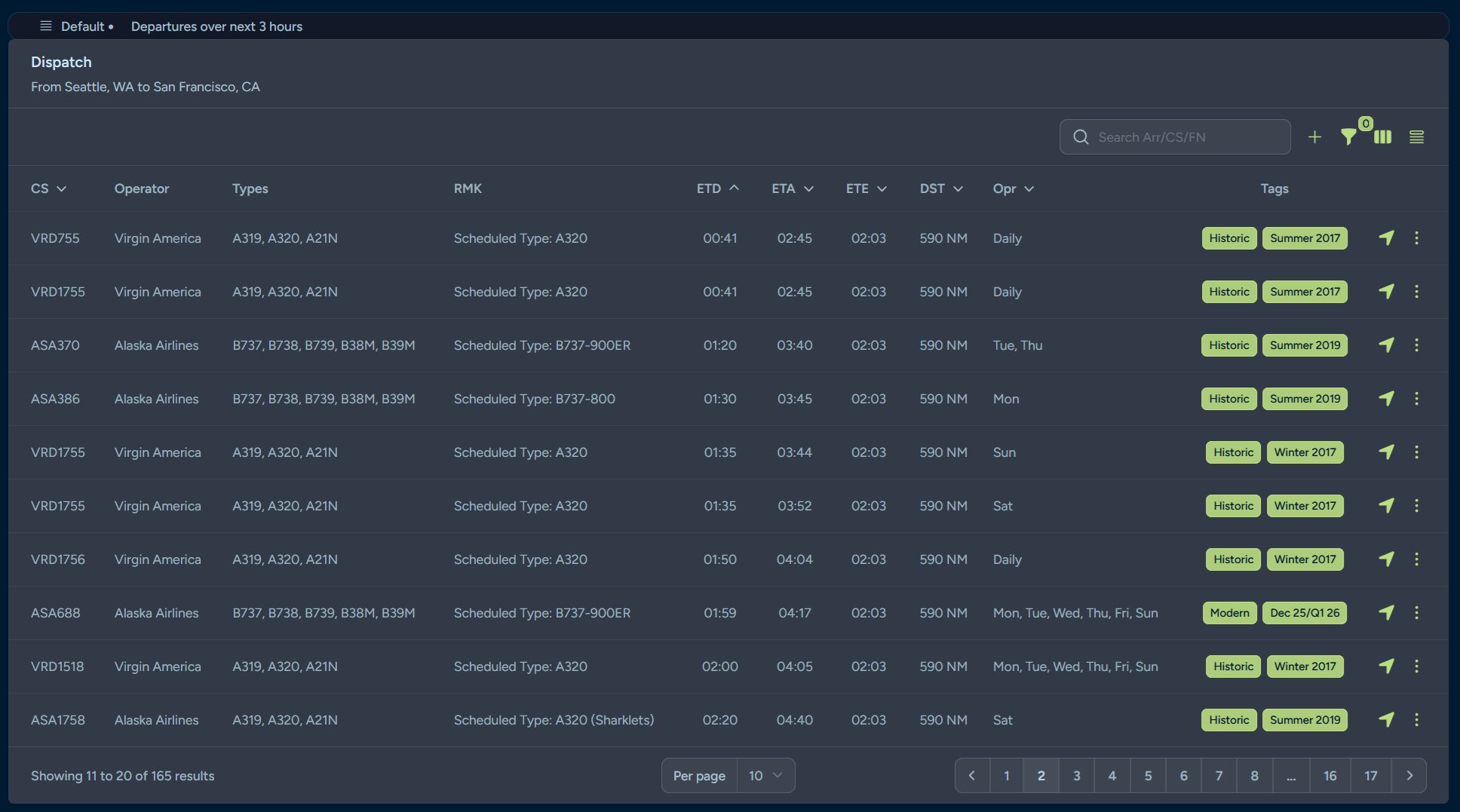 Screenshot taken during dispatch showing a mixture of modern and historic flights.
Aircraft
Aircraft Categories and Substitutions
We do not allow aircraft substitutions. However, we do assign an aircraft category to each flight based on which aircraft type was assigned to operate each flight when we uploaded our schedule data. These categories are generated grouped together into multiple subvariants of a parent type. For example, if ASA123 from KABC to KDEF is operated with a B737-700, you will be able to book the B737, B738, B739, B38M, or B39M on that flight.
Instances will arise where the aircraft that was correct as of the last schedule update is no longer correct. Due to the way our software works, you cannot substitute the current, correct aircraft in place of the previous aircraft; doing so will cause your PIREP to be invalidated. We understand that this can be frustrating, but often times there will be another flight on the same pairing with a different flight number that may have the aircraft type you want to fly available.
Note that vAMSYS does not allow us to restrict aircraft types or categories by rank. All aircraft and routes are available to all pilots starting at 0 hours.
We believe this system provides sufficient flexibility to allow members to operate fairly realistically without making things an unstructured free-for-all.
Modern Schedules - Alaska/Hawaiian:
| Category | Aircraft Types |
|---|---|
| Regional 1 | E175 |
| Mainline Boeing | B737, B738, B739, B38M, B39M |
| Mainline Island | B717 |
| Widebody Boeing | B789 |
| Widebody Airbus | A332 |
| Alaska Cargo | B737, B738 |
| Hawaiian Cargo | A333 |
Historic Schedules - Alaska:
| Category | Aircraft Types |
|---|---|
| Historic Mainline Narrow-body A | A319, A320, A21N |
| Historic Mainline Narrow-body B1 | B732, B734 |
| Historic Mainline Narrow-body B2 | B738 |
| Historic Mainline Narrow-body C | MD-82, MD-83 |
| Historic Regional A | CRJ7 |
| Historic Regional B | DH8D |
| Historic Regional C | F28 |
Historic Schedules - Hawaiian:
Reserved
Historic Schedules - Virgin America:
| Category | Aircraft Types |
|---|---|
| Historic Mainline Narrow-body A | A319, A320, A21N |
Historic Schedules - Jet America:
| Category | Aircraft Types |
|---|---|
| Historic Mainline Narrow-body A | MD-82 |
Approved Aircraft Add-ons
If there is an add-on that you don’t see in one of the tables below, check the Prohibited Aircraft Add-on List before you use it for a PIREP. If it's also not on that list and you'd like to know if it's approved, reach out to us via Discord or email at asa@fusionvaa.com.
Mainline
If a cell is empty (-) then there is no approved aircraft add-on for that aircraft type for that simulator
| Aircraft | MSFS | P3D | XP11/12 |
|---|---|---|---|
| Boeing 737-700 | PMDG 737-700 | PMDG 737-700 | LevelUp 737-700 |
| Boeing 737-800 | PMDG 737-800 | PMDG 737-800 | Zibo 737-800 LevelUp 737-800 |
| Boeing 737-900 | PMDG 737-900 | PMDG 737-900 | - |
| Boeing 737-900ER | PMDG 737-900ER | PMDG 737-900ER | LevelUp 737-900ER |
| Boeing 737 MAX 8 | iFly 737 MAX 8 | iFly 737 MAX 8 | Max Design 737 MAX 8 |
| Boeing 737 MAX 9 | - | - | Max Design 737 MAX 9 |
| Boeing 787-9 | Horizon 787-9 | QualityWings 787-9 | Magknight 787-9 |
Regional
If a cell is empty (-) then there is no approved aircraft add-on for that aircraft type for that simulator
| Aircraft | MSFS | P3D | XP11/12 |
|---|---|---|---|
| Embraer ERJ-175 | FSS ERJ-175 | FeelThere ERJ-175 | X-Crafts ERJ-175 FPS ERJ-175 |
Historic
If a cell is empty (-) then there is no approved aircraft add-on for that aircraft type for that simulator
| Aircraft | MSFS | P3D | XP11/12 |
|---|---|---|---|
| Airbus A319ceo [CFM] | Fenix A319ceo | FSLabs A319 Aerosoft A319 | ToLiss A319 |
| Airbus A320ceo [CFM] | Fenix A320ceo | FSLabs A320ceo Aerosoft A320 | FlightFactor A320 ToLiss A320ceo |
| Airbus A321neo [CFM LEAP] | inibuilds A321neo (MSFS2024) FSLabs A321neo | - | ToLiss A321neo |
| Bombardier Dash 8-Q400 | - | Majestic D8HD | FlyJSim DH8D |
| Bombardier CRJ-700 | Aerosoft CRJ-700 | Aerosoft CRJ-700 | AD Simulations CRJ-700 |
| Fokker F28 | JustFlight Fokker 28 | - | - |
| McDonnell Douglas MD-82/83 | Leonardo MaddogX | Leonardo MaddogX | Rotate MD-80 |
Prohibited Aircraft Add-ons
We understand that by prohibiting certain add-ons, we may disappoint some users. We also understand that these prohibitions can result in an entire aircraft type being excluded from a simulator platform. An aircraft type being included in our schedules does not mean that we guarantee that an acceptable add-on representing that type is approved for use with our VA.
The vASA team wants these aircraft types to be represented as badly, if not more so, than our users do. We have a certain standard of realism and quality that we want to promote, and so for the add-ons that we feel fall short of these standards, or add-ons that we think take advantage of the flight simulation community, we chose to exclude them so that we are able to deliver on one of our goals: maximizing realism where it counts.
The following aircraft are prohibited from use; any PIREP filed with them will be invalidated.
- MSFS Fenix A321ceo: Alaska/Virgin America did not operate the A321ceo (A321), so it is not an acceptable substitution for an A321neo (A21N). It is obviously an immensely high quality add-on, the prohibition is due to aircraft type and not add-on quality.
- MSFS FlyByWire/Default A320neo: Alaska/Virgin America did not operate the A320neo, so it is not an acceptable substitution for an A320ceo.
- MSFS iniBuilds A320neo: Alaska/Virgin America did not operate the A320neo, so it is not an acceptable substitution for an A320ceo.
- MSFS Bravo Airspace/Horizon/Kuro 787-8: Hawaiian/Alaska do not operate the B788 and it is not a valid substitution for the B789.
- MSFS Default/HeavyDivision 787-10: Hawaiian/Alaska do not operate the B78X and it is not a valid substitution for the B789.
- MSFS LatinVFR Airbus Family (even when combined with the Horizon mods): This add-on's quality is too poor to be approved.
- MSFS Bredok3D Boeing 737 MAX: This add-on's quality is too poor to be approved.
- MSFS Virtualcol ERJ-170/175/190/195: This add-on's quality is too poor to be approved.
- XP11/12 Toliss Airbus A320neo: Alaska/Virgin America did not operate the A320neo (A20N), so it is not an acceptable substitution for an A320ceo (A320).
- XP11/12 Toliss Airbus A321ceo: Alaska/Virgin America did not operate the A321ceo (A321), so it is not an acceptable substitution for an A321neo (A21N).
If you have any questions about this list, feel free to contact us via Discord or email.
Aircraft Scoring Rules
Each aircraft has a unique set of scoring criteria which determines what items grant or remove points from a PIREP total when processed.
There are some instances where a new or rare addon may flag events such as flap extensions with different values from what vAMSYS and Pegasus are currently configured to recognize and as a result may result in PIREPs being flagged with inaccurate violations. The staff team will catch as many of these as possible during review and will update the scorers to reflect these new variables whenever possible.
Pilots should view any positive points values as bonus points and any negative points as a required procedure. For example, Single-Engine Taxi should be done whenever it is advantageous to do so, but it is more important to ensure that the minimum engine warm-up or cool down time is met.
To see a detailed table describing the scoring rules for all vASA aircraft, click "Documents" in the left-hand navigation menu in vAMSYS and then select "Scores" from the drop-down menu.